Network Configuration
Add device
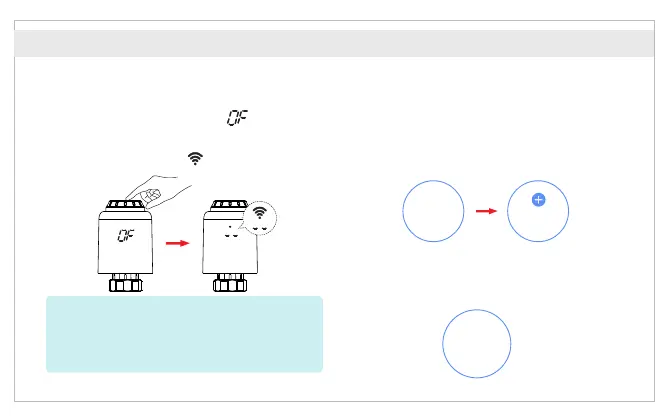
① Under manual mode, rotate the knob
counterclockwise until “ ” is displayed.
Then long press the middle button for
3 seconds until “ ” is blinking.
② In the APP gateway interface, select “Zigbee
device list Add Device", click “ ", wait for several
seconds to search, the system will automatically
search and add devices, and then click “ ".Done
③ After the device is named, click “ ", the Done
radiator thermostatic valve is added.
*Attention: Network configuration can only be done
under manual mode.
The gateway must be added before adding TRV.
The TRV must be added in the page of gateway.
Zigbee
devices list
Add
devices
Done
English



 To Next Page