Mode selection
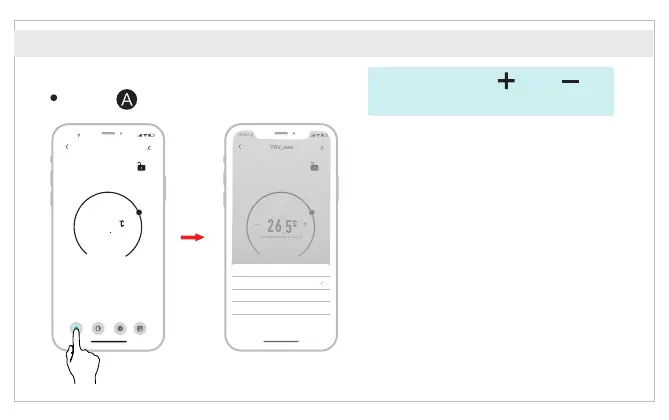
Click “ ” to select mode.
Auto mode: Four time periods and
setting temp. could be programmed
per day, one week as a cycle, based
on customized needs.
APP Features
*Attention: Click “ ” or “ ” to
adjust the setting temperature.
Manual mode: The device will work
according to current setting temp.
without controlled by the time period
program.
ON mode: The valve will open in heating.
16 :00
TRV_new
-
+
26
5
Current temperature 26.6°C
Mode
Working status
State of the window
Auto
Pause
Close
Week-prog...
A
Auto
Setting Statistics
OFF mode: The valve will be closed to
stop heating.
16: 00
TRV_new
-
+
26
5
Current temperature 26.6°C
Mode
Working status
State of the window
Auto
Pause
close
A
Week program Setting
Mode
Manual
OFF
ON
Cancel
Mode
Auto
English



 To Next Page