APP Features
Device sharing function
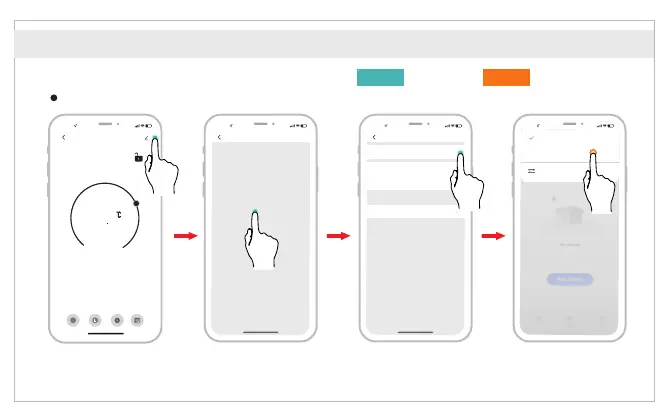
Share the device to other family members, allowing them to remotely control the TRV device.
① Click the Menu button,
then click “Share Device”.
② Click “Add home
member”.
③ Fill in account
information of home
member.
④ Mobile phone B
agrees to join.
16 :00
Help
Currently, you cannot share Bluetooth mesh devices,
Zigbee devices, infrared devices, and Bluetooth Beacon
devices with other users.
Cause of Sharing Failure
If a permanent resident in your home has an account,
we recommend that you set the account as a family
member and share all your family devices with the family
member.
Add Home Member
Name
Please enter a home member na...
China
Region
Kontonum...
Only after accepting the invitation will the account owner
become a family member and be able to use relevant
functions.
Please enter your account
Account
Common Member
Family Role
16 :00
Add Member
No devices
Add Device
Home Smart Me
16 :00
Love
home Waiting to join...
Home Management
* Example of mobile sharing mobilePhone A Phone B
16 :00
TRV_new
-
+
26
5
Current temperature 26.6°C
Mode
Working status
State of the window
Auto
Pause
Close
Week-prog...
A
Auto
Setting Statistics
English



 To Next Page