
 Need help?
Do you have a question about the TV Ears Digital System and is the answer not in the manual?
Connect the audio cord (red and black plugs) to the analog audio out ports on the TV or source device.
Place the transmitter on a flat surface 3-5 feet off the ground, pointing towards the seating area.
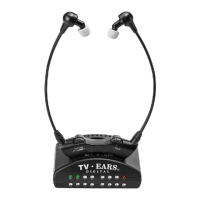
Place the headset in the transmitter-charging cradle and ensure charging lights illuminate.
Connects the TV Ears system using a digital audio connection like optical or coaxial.
Uses the Alternative Installation Kit with a power microphone to capture TV audio.
Uses the AIK with a headphone jack adapter for audio input when other ports are unavailable.
Instructions on how to put on, operate, and remove the TV Ears headset.
 General
| Technology | Infrared |
|---|---|
| Battery Life | Up to 6 hours |
| Power Source | Rechargeable battery |
| Headphone Type | Over-ear |
| Digital/Analog | Digital |
| Channels | Stereo |
| Compatibility | Works with TVs, stereos, and other audio devices |
| Connection | Digital optical, analog |
| Battery Type | Rechargeable NiMH |
| Charging Method | Docking station |
| Type | Wireless TV headphones |
| Frequency Response | 20 Hz - 20 kHz |
| Volume Control | Individual volume control per ear |
| Sound Enhancement | Voice Clarification technology |

 To Next Page