Installation | Step 1
Connect the Transmitter to your TV
Analog Audio
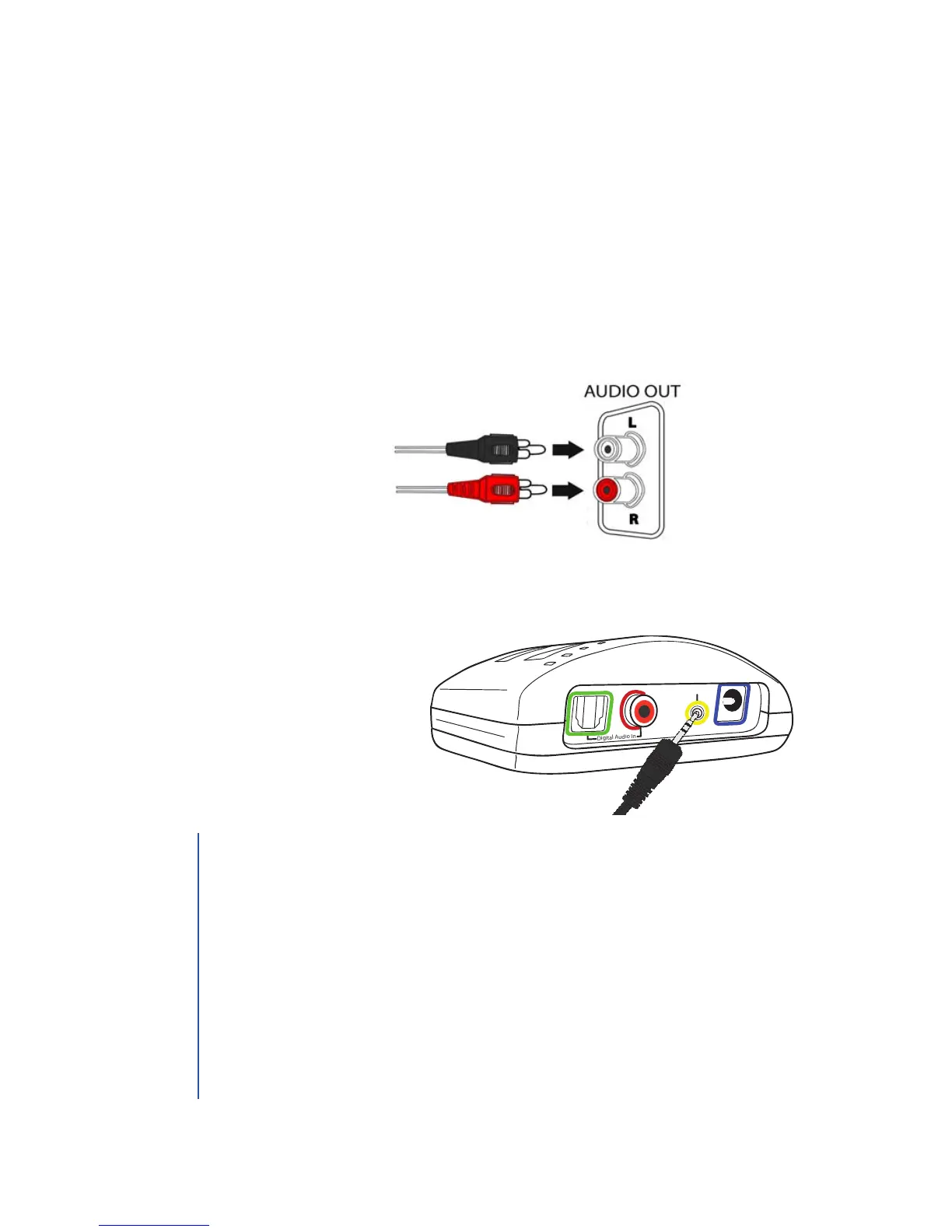
1. Plug the dual end of the audio cord (red and black male plugs)
into the analog (RCA) audio out ports on the back of the
television, satellite, or cable box.
2. Plug the single end of the audio cord into the port labeled
Analog Audio In on the back of the TV Ears transmitter.
Digital Audio In
Analog Audio In
12
V
7
1. Ports on the front of TVs are usually audio in ports and will not
send sound to your TV Ears.
2. Fixed/Variable Audio Setting: audio out ports may be marked
xed or variable/xed or L& R. A xed audio out setting will allow
the television volume to work independently from the TV Ears
headset. The television volume can be on mute or at a low level
while the TV Ears’ volume can be turned up.
• Consult your television manual / manufacturer to manually
program the television to FIXED audio if currently set to
VARIABLE audio.
TIP


 To Next Page