Installation | Step 3
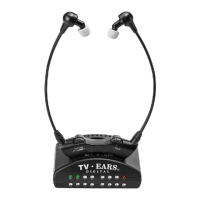
Charging the Headset
Each headset comes pre-charged with enough battery power for at
least 10 minutes of use. The headset will last around 6 - 8 hours on
a full charge, but will decrease as the volume reaches higher levels.
A fully exhausted battery will take between 8 - 10 hours to charge
completely. The 1 hour “Quick Charge” feature will rapidly charge a
partially drained battery suciently for typical use, which is around 2
to 4 hours.
1. Turn the headset volume knob to the o position. You will hear
and/or feel a click when it has been turned all the way into the o
position.
2. Place the headset in the transmitter-charging cradle facing
forward.
3. Check to see that the charging lights illuminate. The left charging
light will illuninate if there is a headset in the front cradle and
the right charging light will illuninate if a headset is in the rear
charging cradle.
We recommend storing the headset in the charging cradle of
the transmitter when not in use to avoid damaging the headset.
Remember, the headset needs to be turned o when not being used
and it cannot be over-charged.
9


 To Next Page