FHD High Bright Field Monitor 22
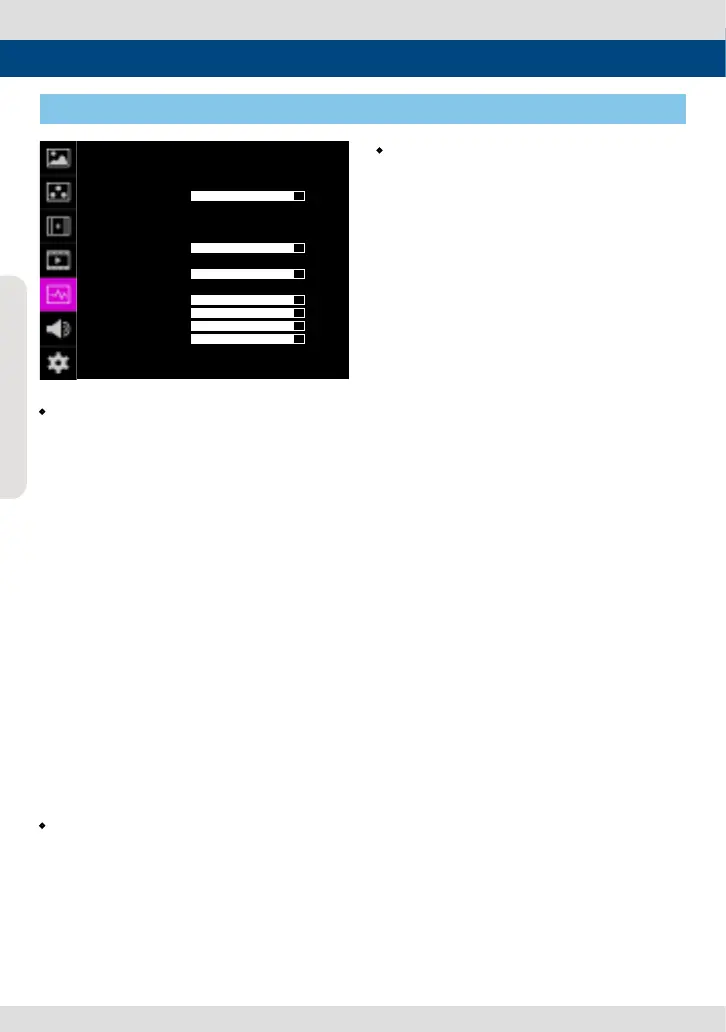
• LUMA CHECK
- Displays the Luma(Y’) level of the input image
in colors.
- Can select between [Color Pattern] or [Zebra
Pattern].
- Each pixel’s Y’ analized and changed to a certain
color or zebra pattern according to the Index
on the right side of the screen.
- When a pixel’s Y’ level is under 0%(16), the color
/diagonal line will be colored Green.
- When the pixel’s Y’ level is over 100%(235), the
color / diagonal line will be colored Red.
- When the Y’ level of a pixel is between 0~100%,
the pixel is displayed with Gray, except for
selected Luma Zone.
- In the [Color Pattern] mode, a 5% zone of the
selected Y’ level will be colored Pink(5%) and
±10% will be colored Yellow(-10% from Pink)
and Cyan(+10% from Pink).
- In the [Zebra Pattern] mode, ± 5% of the
selected Y’ Level will be displayed with
diagonal lines.
• LUMA ADJUST
- Used to set the Y’ level to be colored Yellow,
Pink and Cyan in [Color Pattern] mode, or
to set Y’ level zone to be displayed with
diagonal lines in [Zebra Pattern] mode
simply by scrolling the Knob.
- Available values are 0 ~ 100%.
*
See section “7. Other Function [5] Luma(Y’)
Zone Check” for more information.
[5] WAVEFORM
5. Menu Operations
• RANGE ERROR
- Used to set whether or not to activate Y
MAX, Y MIN, C MAX, C MIN, Y PICTURE BLINK
and C PICTURE BLINK functions.
- The values of Y MAX, Y MIN, C MAX, C MIN are
indicated in Waveform/Vectorscope.
- If [Y PICTURE BLINK] or [C PICTURE BLINK] is
enabled, the section of image that exceeds
the selected values of Y MAX, Y MIN, C MAX
and C MIN shall blink.
* In the case of RGB input, Range Error is not
supported.
*
See section “7. Other Function [7] Range
Error” for more information.
WAVEFORM F-7H
ENABLE
TYPE
INTENSITY
TRANS
SIZE
LINE WAVEOFORM
SEL LINE POS
LUMA CHECK
LUMA ADJUST
RANGE ERROR
Y MAX
Y MIN
C MAX
C MIN
Y PICTURE BLINK
C PICTURE BLINK
OFF
OFF
OPAQUE
SAMLL
OFF
OFF
OFF
OFF
OFF
+ 90
+ 90
+ 90
+ 90
+ 90
+ 90
+ 90


 To Next Page