TVS X User Manual - Rev 0 - As on 16 July 2024
19
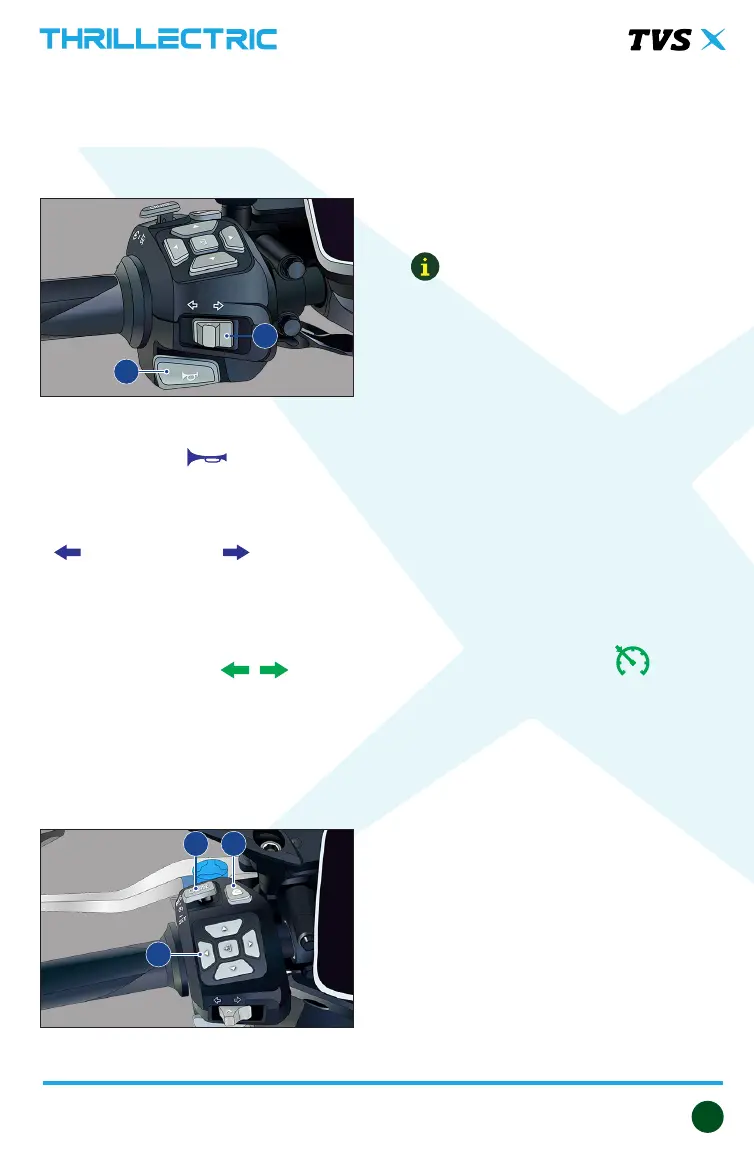
SWITCH ASSEMBLY LH
The LH side switch assembly is situated
in the handlebar on the left side and
encompasses the following switches.
1. Horn switch
Press the switch ‘ ’ to operate the
horn.
2. Switch turn signal lamp
Slide the turn signal lamp switch to left
‘ ’ or right side ‘ ’ to operate
respective turn signal lamps (LH / RH).
Push the switch ‘IN’ to cancel.
When the ‘left’ or ‘right’ side turn
signal lamps are activated, respective
turn signal indicator ‘ ‘ of the
instrument cluster flashes along with it.
3. Navigation switches
The navigation switches are used to
operate the menu screens on the
cluster.
4. Seat unlock switch
Press the switch to open the rider seat
thereby accessing the utility box while
the vehicle is powered ‘ON’.
Press back the seat to its original
position to lock it.
Note:
The rider seat can be opened using the
menu setting or from drop down menu
of the instrument cluster. Refer page
32 for details.
5. Cruise control switch
Cruise control switch has three options
in it.
Cruise control main switch operation:
Momentary vertical press of cruise
control switch knob turns ‘ON / OFF’
the cruise control.
- When the cruise control is activated,
the cruise control indicator of the
instrument cluster ‘ ’ glows
along with it.
Cruise control ‘Set/- & ‘Res/+’ switch
operation:
Gentle push of cruise control switch
knob towards ‘Set/-’ position activates
the ‘Set/-’ switch.
While the cruise control is turned ‘ON’
(cruise state), you can decrease already
set cruise speed in the following
manner:
- Gently push the Cruise control
switch knob towards ‘Set/-’ position
to decrease the cruise speed by
1km/h
45
3
1
2


 To Next Page