TVS X User Manual - Rev 0 - As on 16 July 2024
38
UNLOCKING AND LOCKING
USING INSTRUMENT CLUSTER
To unlock the scooter, press the power
switch ON ‘ ‘ (refer page 23).
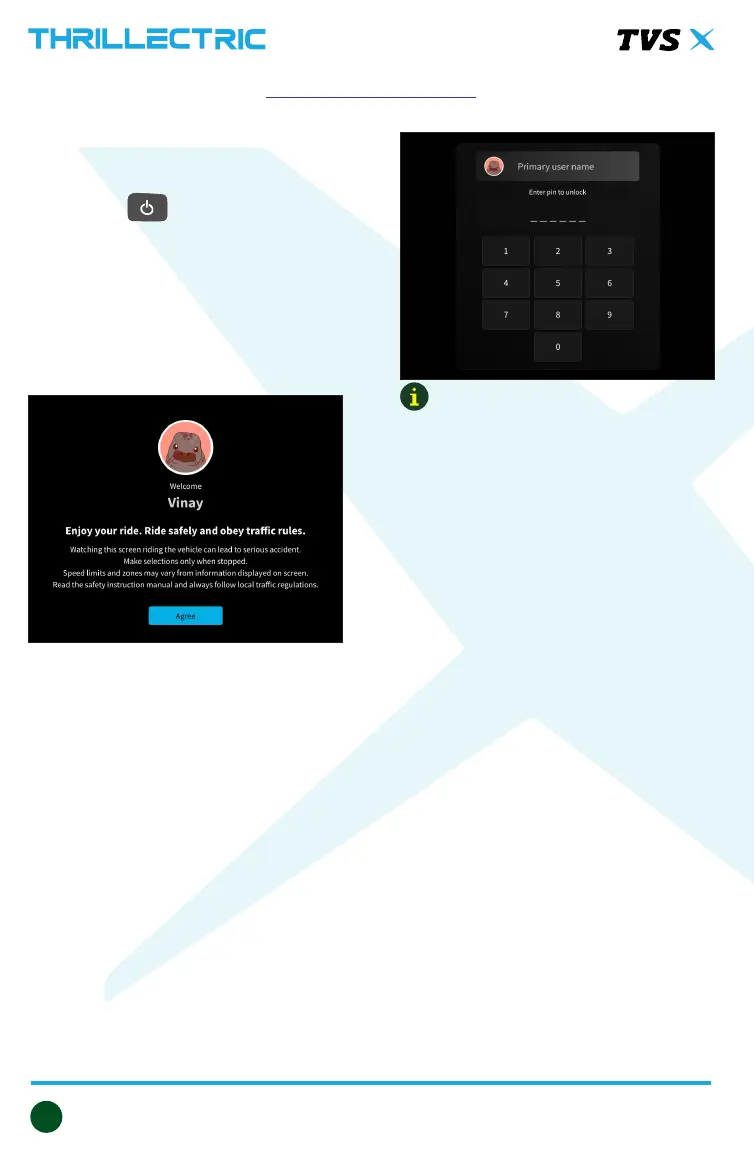
Once the vehicle is powered ‘ON,’
the instrument cluster will showcase
a welcome screen. Simply tap on the
rider profile image to choose the desired
rider profile and enter the appropriate
passcode.
Upon powering ‘ON’, a self-check is
performed on the lighting system, and
the instrument cluster awaits password
input. Additionally, the headlamp,
illuminating light, number plate lamp,
and tail lamp are illuminated.
Once you’ve chosen the preferred rider,
input the correct passcode. When the
passcode is successfully entered, the
scooter automatically unlocks, allowing
the steering to move freely.
For locking the scooter, park it on a level
and stable surface, turn the handlebar
completely to the right or left, and then
press the power switch.
RIDING YOUR TVS X
Note:
When the vehicle is powered ‘ON’,
all electrical circuits engage, and the
steering is unlocked.
The vehicle can be unlocked using the
connected app and the smart watch
app once it is paired with your mobile
phone.


 To Next Page