TVS X User Manual - Rev 0 - As on 16 July 2024
40
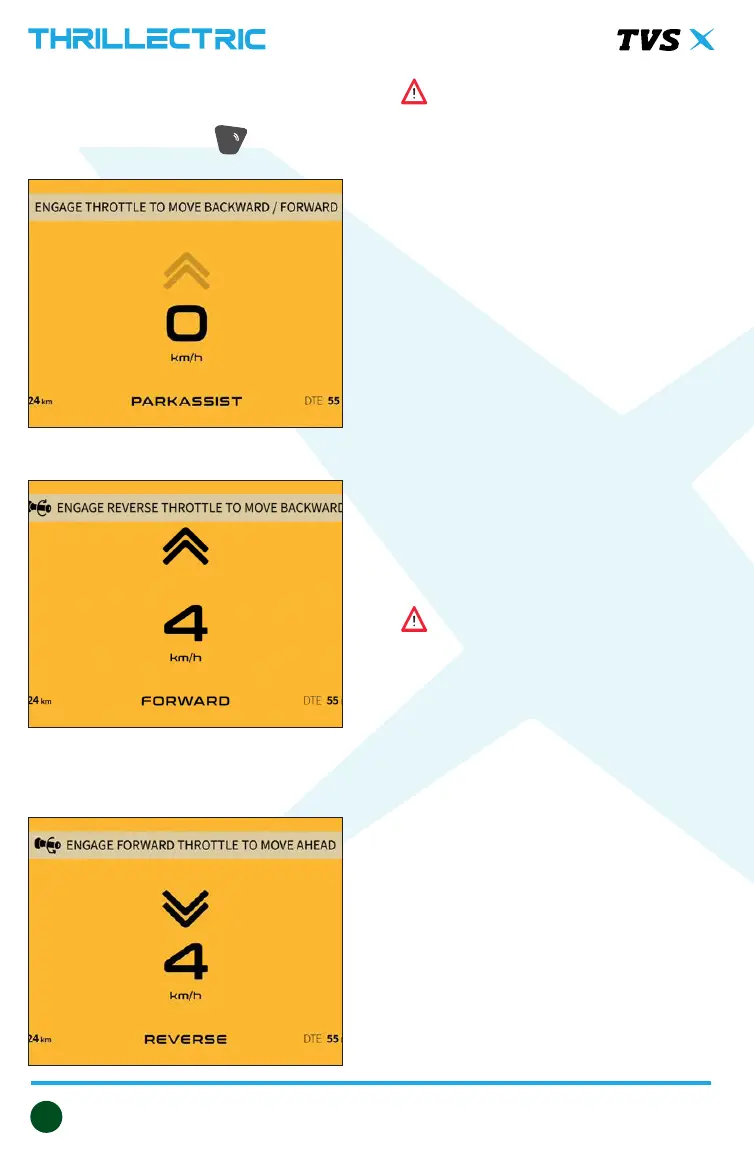
PARKING MODE
To activate parking mode, simply press
the park assist switch ‘ ‘ located on
the handlebar (refer page 22).
P
Warning
Ensure there are no obstacles behind
you when reversing, despite the
restricted speed, to prevent collisions.
ABS BRAKING SYSTEM
The TVS X is equipped with a single
channel Anti-lock Braking System (ABS)
designed to prevent skidding and assist
in maintaining steering control during
emergency stops, whether on dry, wet,
or loose gravel roads.
Brake lever pulsation is normal:
When performing a hard stop, you
may notice a rapid pulsation in the
front brake lever. This sensation is
completely normal and occurs due
to the modulation of pressure in the
brake circuit by the Hydraulic Electronic
Control Unit (HECU).
Warning
The ABS can apply and release pressure
in the brake circuit much faster than
a rider can with the brake lever,
preventing wheel locking. Therefore,
there’s no need to pump the brake;
continuous application is sufcient.
Using only the front or rear brake is
dangerous and can cause skidding and
loss of control. Apply both the brakes
together and with great care on a wet
road or other slippery surfaces.
Any abrupt braking on slippery or
irregular roads can cause loss of rider
control.
Twist the throttle grip to move the
vehicle forward at a restricted speed.
Alternatively, Twist the throttle grip
away from you (reverse direction)
to move the vehicle in reverse at a
restricted speed.


 To Next Page