TVS X User Manual - Rev 0 - As on 16 July 2024
50
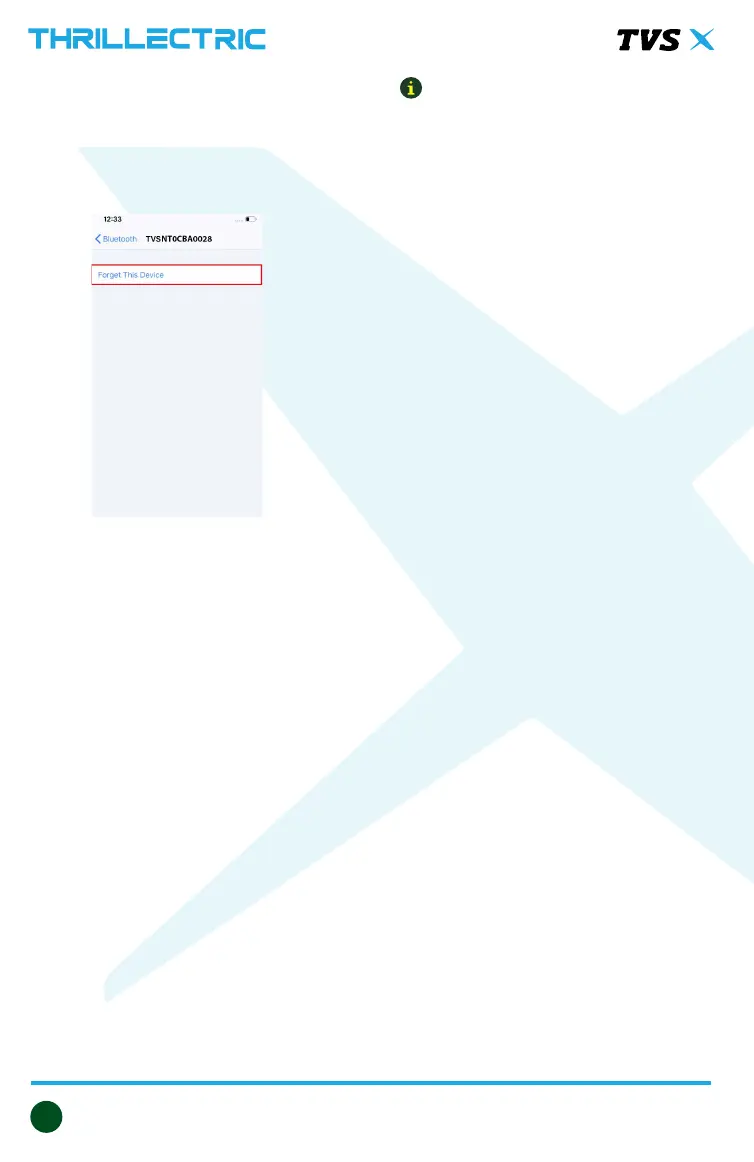
1. In the previous connected iPhone, open
the SETTINGS -> BLUETOOTH.
2. Select the instrument cluster, which
was connected previously.
3. Click on the “Forget this device”.
Auto pairing
Once the rst time pairing is done
between vehicle’s instrument cluster
and your smart phone, the phone will
automatically connect with the vehicle
when the following conditions are met:
1. Vehicle is switched ‘ON’ and vehicle
is near to the smart phone.
2. Smart phone’s Bluetooth is turned
‘ON’
3. First time pairing is ensured.
4. In case of iPhone, the ‘TVS connect’
app should be open or be open
in background for auto-pairing to
happen.
Every time auto-pairing happens, app
will open automatically and connect
with the Instrument cluster.
Note
If the phone enters battery saver mode,
auto-pairing might not happen. It takes
maximum of ve minutes for auto-
pairing and it can happen in vehicle
running or in idle condition.
Auto-pairing happens only if the
application is locked in the RAM in
multitasking screen of the phone which
has customized OS (Ex : MI, Vivo etc.)
In case of Android phones with Android
OS version above 8.0, for App to work
seamlessly, any battery optimization
setting to be removed in the TVS
Connect App and GPS shall be allowed
to run in background in high accuracy
mode.
Even if your phone’s Bluetooth is
already paired to other gadgets like
smart watch, health band or helmet,
the auto-paring works with your
TVS X’s connected instrument cluster.
If the application unfortunately stops
due to unforeseen circumstances, close
and reopen the application and do the
manual pairing for the rst time, then
auto pairing will happen subsequently.
For rst time pairing, logout from
the app, login again with your login
credential and press ‘CONNECT’ tab.


 To Next Page