http://www.tyan.com
26
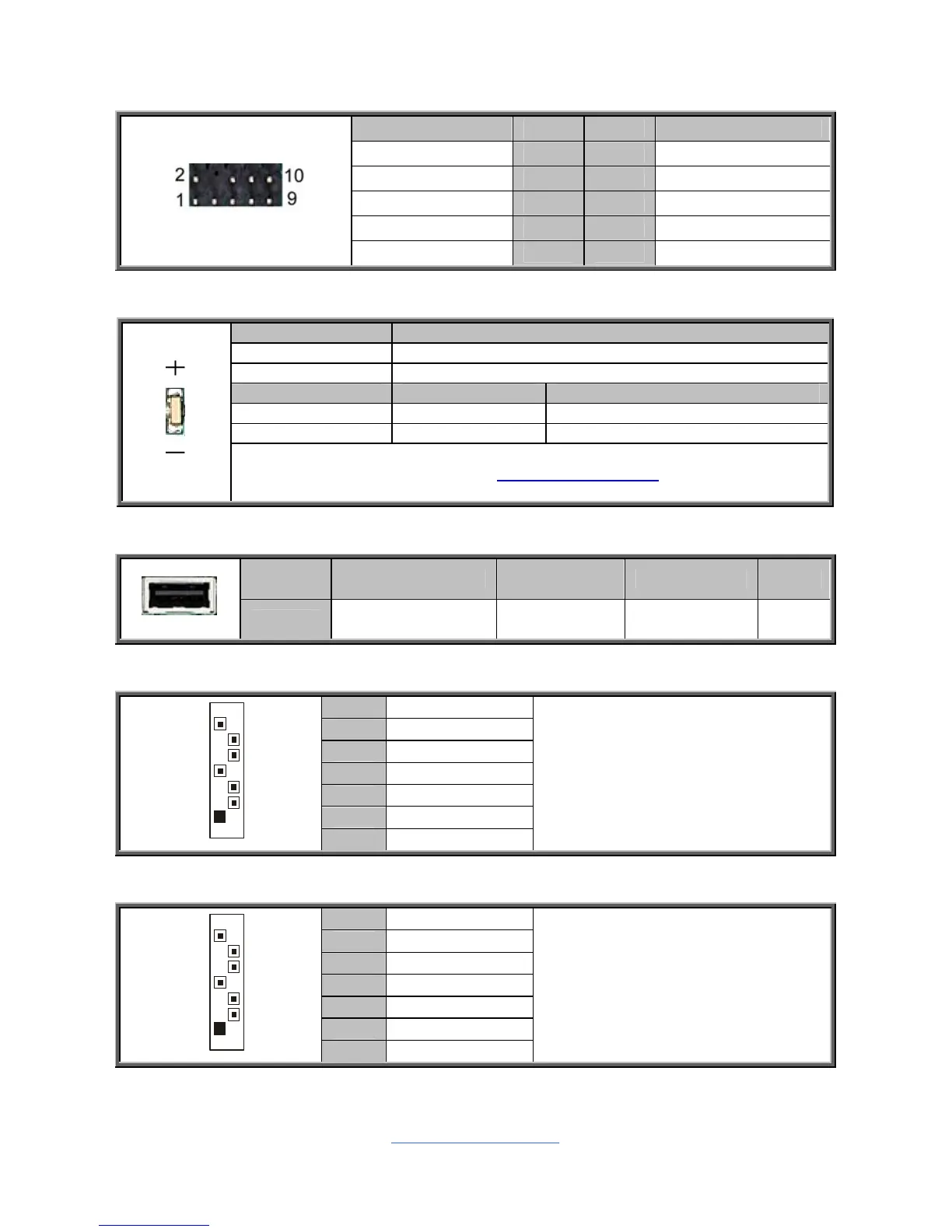
J31: TYAN Module Header
Signal Pin Pin Signal
VCC3 1 2 P80_LFRAME-
LPC_LAD0 3 4 KEY
LPC_LAD1 5 6 P80_RST-
LPC_LAD2 7 8 GND
LPC_LAD3 9 10 CLK_33M_P80
LED1 / SW1: ID LED and ID LED Button
Pin Signal
+ P3V3_AUX
- ID_SW_L
State Color Description
On Blue System identified
Off Off System not identified
NOTE: The ID LED can be activated remotely using IPMI.
Please visit the TYAN Web Site at http://www.tyan.com
to download the
latest IPMI Configuration Guide for more details.
J56: Vertical Type-A USB Connector
Pin 1 2 3 4
Signal USB 5V Power USB Data- USB Data+ GND
J59/J60/J61/J62: SATA2.0 Connector
1 GND
2 SATA TX DP
3 SATA TX DN
4 GND
5 SATA RX DN
6 SATA RX DP
7
1
7 GND
Connects to the Serial ATA ready
drives via the Serial ATA cable.
J59: SATA5 J60: SATA4
J61: SATA3 J62: SATA2
J63/J64: SATA3.0 Connector
1 GND
2 SATA TX DP
3 SATA TX DN
4 GND
5 SATA RX DN
6 SATA RX DP
7
1
7 GND
Connects to the Serial ATA ready
drives via the Serial ATA cable.
J63: SATA1
J64: SATA0


 To Next Page