http://www.tyan.com
41
2.8 Installing the Memory
Before installing memory, ensure that the memory you have is compatible with the
motherboard and processor. Check the TYAN Web site at http://www.tyan.com
for
details of the type of memory recommended for your motherboard.
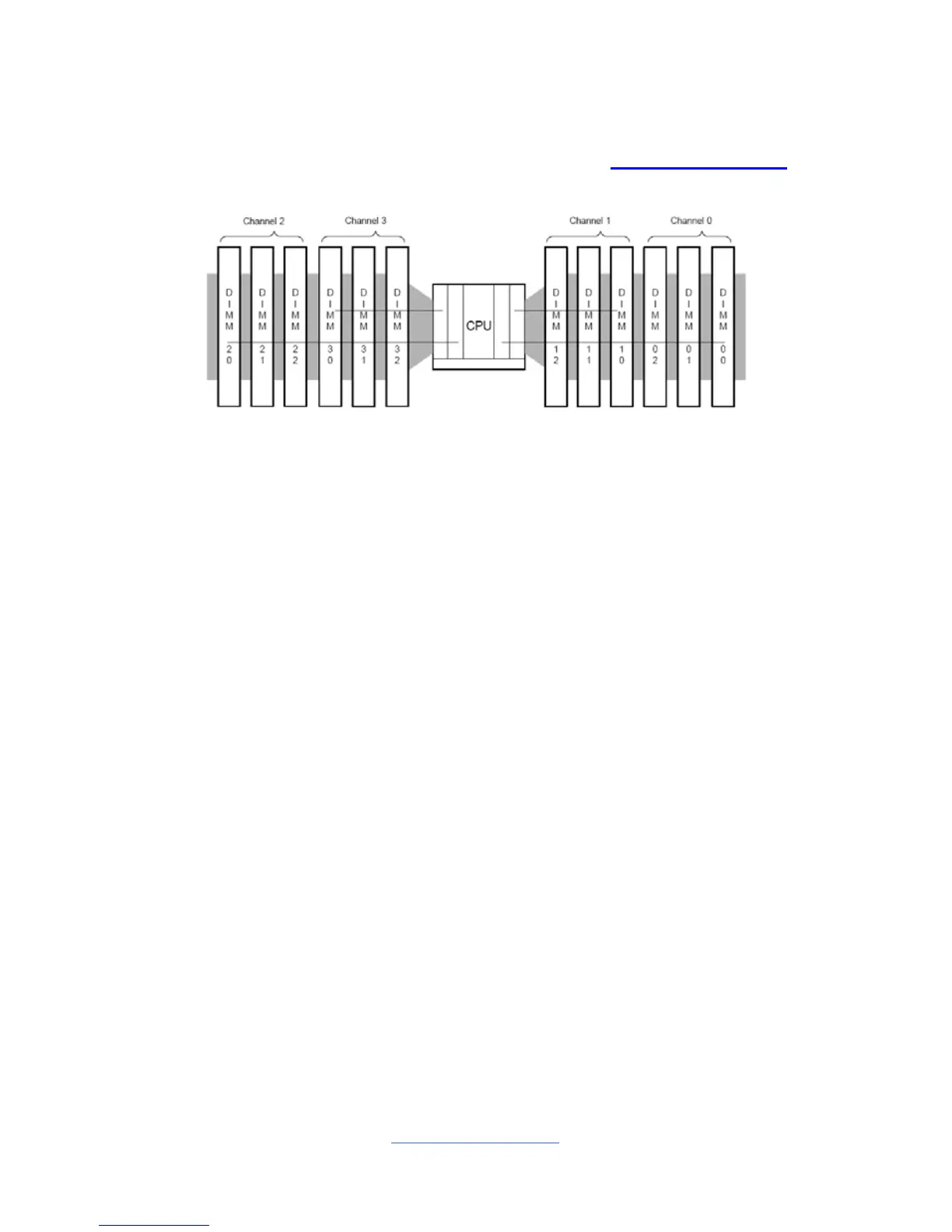
The Sandy Bridge-EP/EX processor is a quad-channel design with a total of 4
DDR3 channels
This platform supports Unbuffered DDR3, Registered DDR3, and LR DIMM
(Load Reduced DIMM) DDR3 for buffered memory solutions demanding
higher capacity memory subsystems.
DDR3 data transfer rates of 1066, 1333, and 1600 MT/s are supported
Each memory channel is 72 or 64 bits wide for ECC or Non-ECC
Both 1.5V and 1.35V DDR3 DIMMs are supported
Gb, 2-Gb, and 4-Gb DDR3 DRAM technologies are supported for these
devices:
— UDIMMs x8, x16
— RDIMMs x4, x8
— LRDIMM x4, x8
Up to 8 ranks are supported per memory channel. DIMMS may be 1, 2 or 4
ranks per module.
All installed memory will automatically be detected. No jumpers or settings
need to be changed for memory detection.
All memory must be of the same type and density. Registered, Unbuffered,
and LRDIMM memory types can NOT be mixed and matched on the
same motherboard.



 To Next Page