English
EIL/MAN/002: REVISION 6 Date: July 2007 Page 8
2.0 Ribbon Selection
Print quality and permanency on Tyco Electronics Identification products is only guaranteed if
the correct thermal transfer ribbon is used for each product. Please refer to the
“Printer/material/ribbon compatibility cross reference” found at
www.tycoident.com or contact
Tyco Electronics.
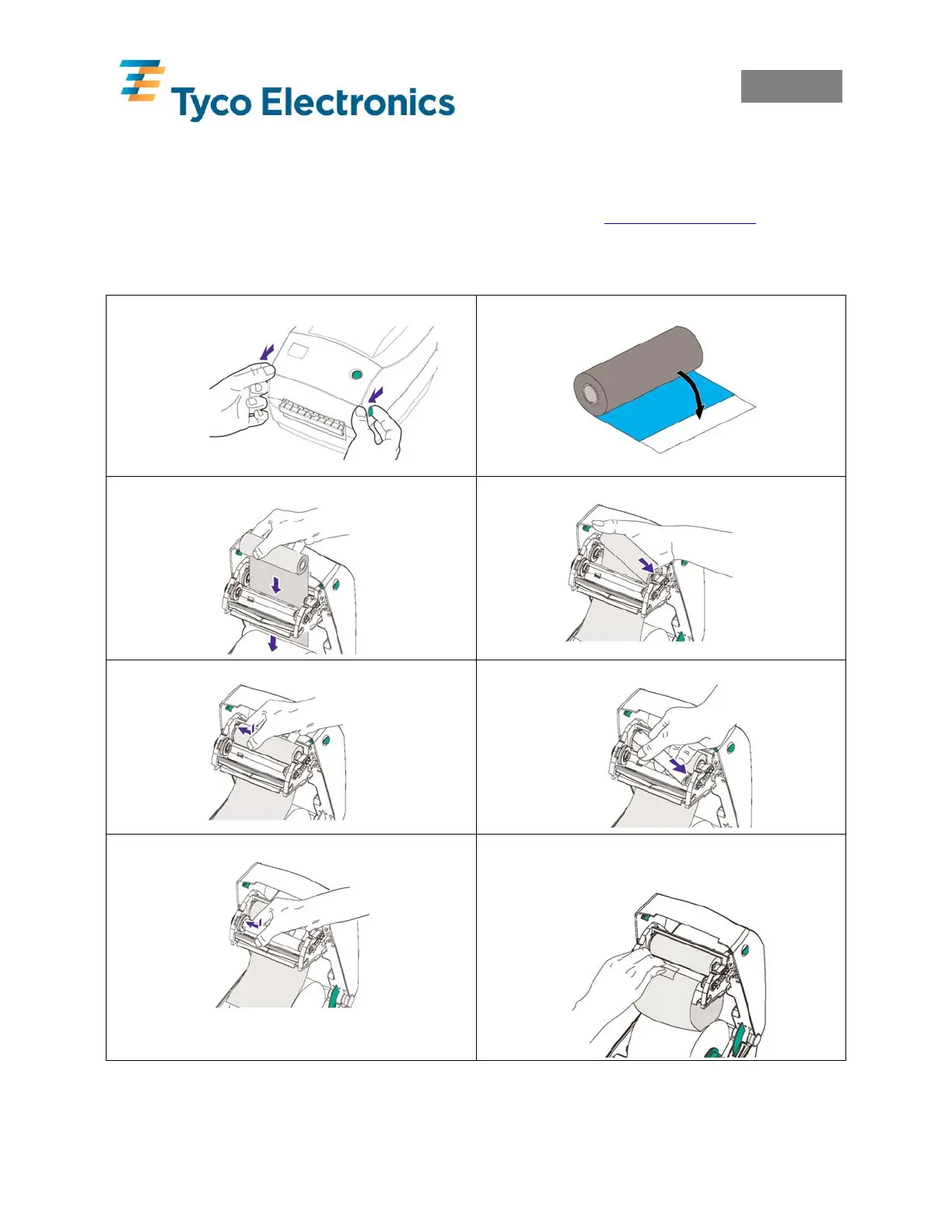
3.0 Loading Ribbon
1. Open Cover.
2. Pull Adhesive Strip Free on ribbon.
3. Thread the ribbon through carriage.
4. Press core onto Hub.
5. Align Notches onto Hub Spokes.
6. Press the take-up core on to the Hub.
7. Align Notches onto Hub Spokes.
8. Attache ribbon to take-up core using
adhesive strip on new ribbons or tape.



 To Next Page