English
EIL/MAN/002: REVISION 6 Date: July 2007 Page 14
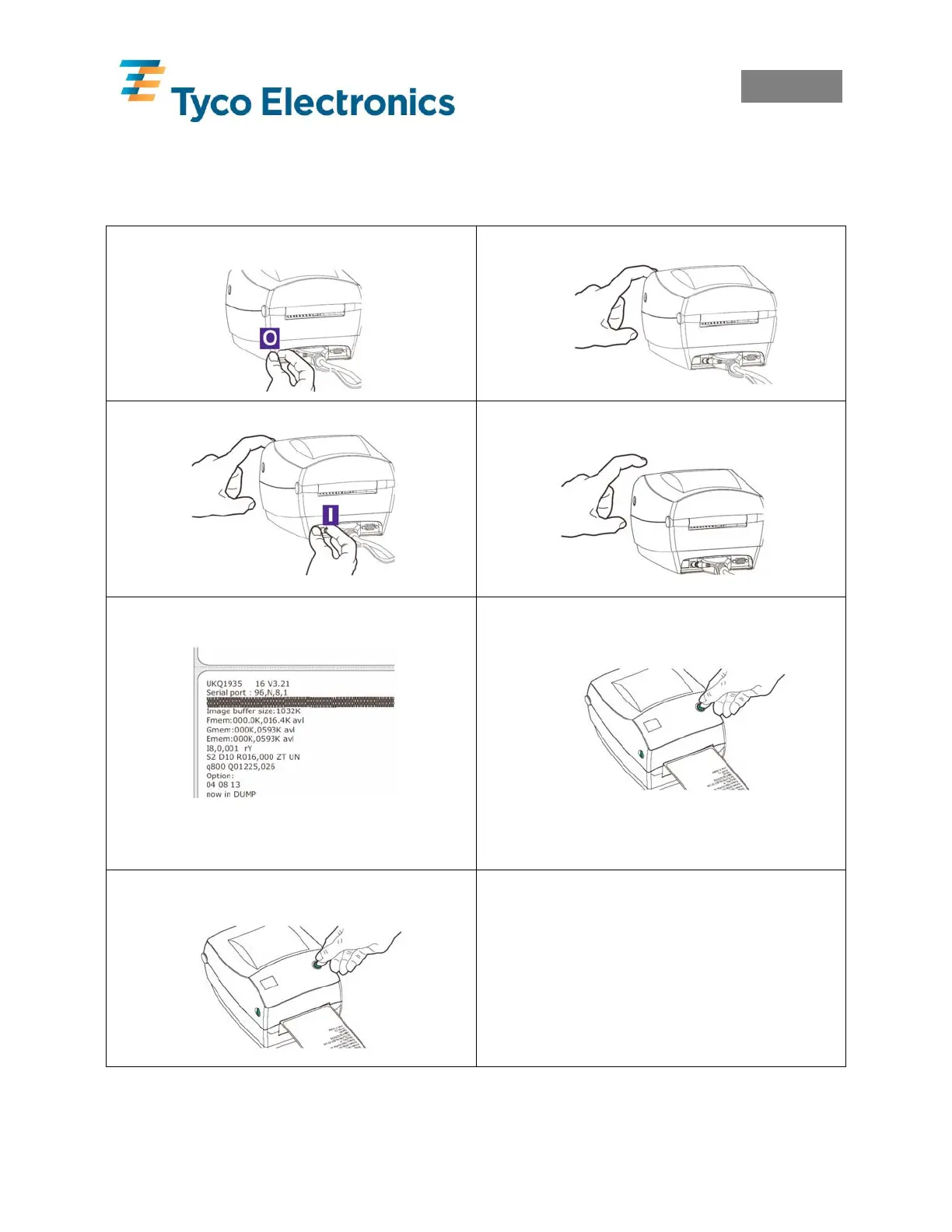
5.0 Calibration
When loading new or changing product types the printer must be calibrated.
Once the product and ribbon are correctly installed, the following procedure must be carried out
1. Power Off.
2. Hold Down Feed Button.
3. Holding Down Feed Button, Power On.
4. Once LED Flashes Red 3 times release
Feed Button.
5. Printer Advances Media and Prints
Status Summary.
Note: Printer is in diagnostic dump mode. The
first line printed on the printout during calibration
will be the firmware version.
6. Press Feed Button to Begin Normal
Operation.
7. Each press of the feed button should
then advance one marker sleeve/label.
Note:
If the printer continuously feeds or feeds more
than one marker sleeve or label at a time, or
the LED remains orange or red then refer
section 5.1 Alignment for Calibration and 11.0
Troubleshooting and then repeat the procedure
calibration procedure .



 To Next Page