C
TRACTOR INSTRUMENTS
30
< Operation >
There are three control modes for an 3P
implement:
- Position control
- Draft control
- Floating mode
• Draft control
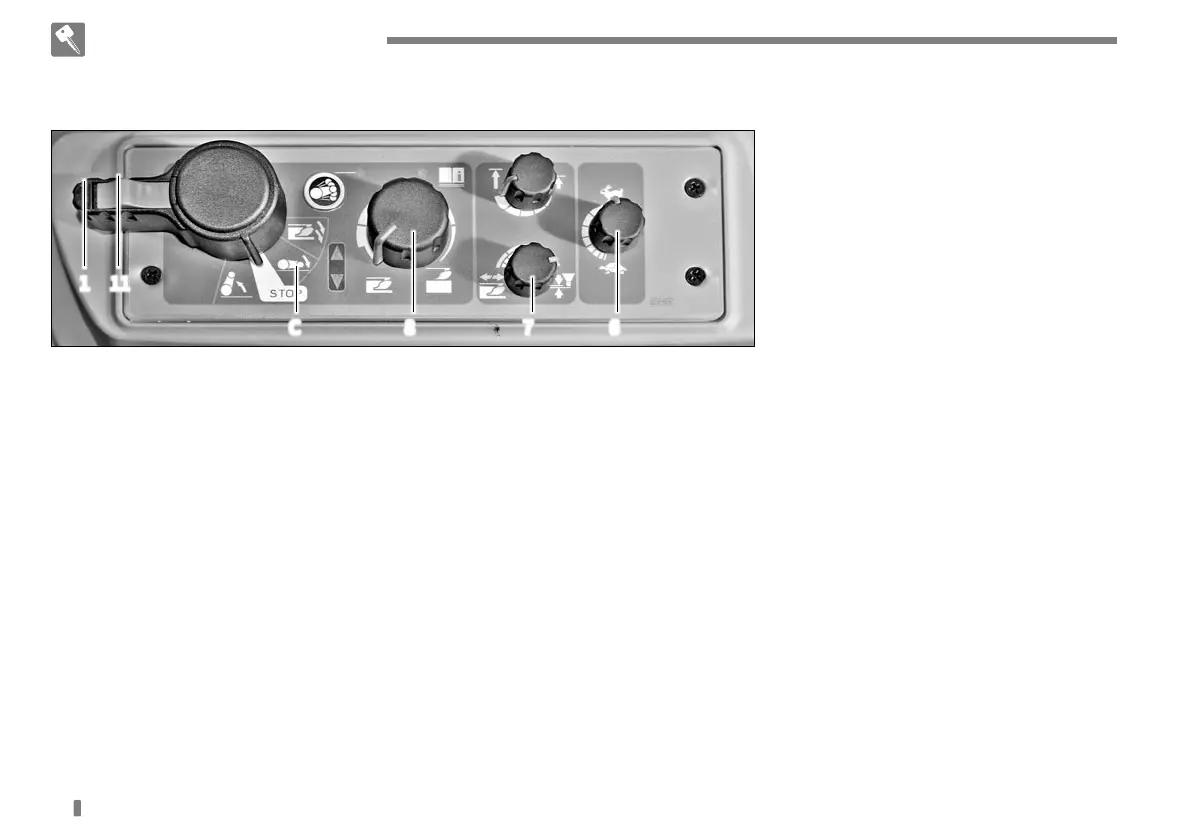
1. Turning the position/draft
sensitivity control knob (7)
counterclockwise increases the
priority of the draft control. Turning
it counter-clockwise to its end
activates only the draft control.
2. Place the lever (1) into the lowering
position (C) and then use the knob
(8) to set the desired working depth.
Turning it counterclockwise lowers
an implement while turning it
clockwise lifts an implement. To lift
or lower an implement at once, use
the lever (1). When the working
depth in a field with an implement
changes greatly, turn the
position/draft sensitivity control
knob (7) clockwise slowly to narrow
the gap.
• Position control
1. Turning the position/draft
sensitivity control knob (7)
clockwise increases the priority of
the position control. Turning it
clockwise to its end activates only
the position control.
2. Lower the implement with the lever
(1) and adjust the lowering speed
with the knob (6).
Then, set the desired working depth
with the knob (8). When lowering or
lifting an implement, use the lever
(1) only to keep the settings.
• Floating mode
Turn the knob (8) counterclockwise
completely to allow swinging
motion of the arm in order to use
the lift in the floating mode.
1 11
C 8 7 6


 To Next Page