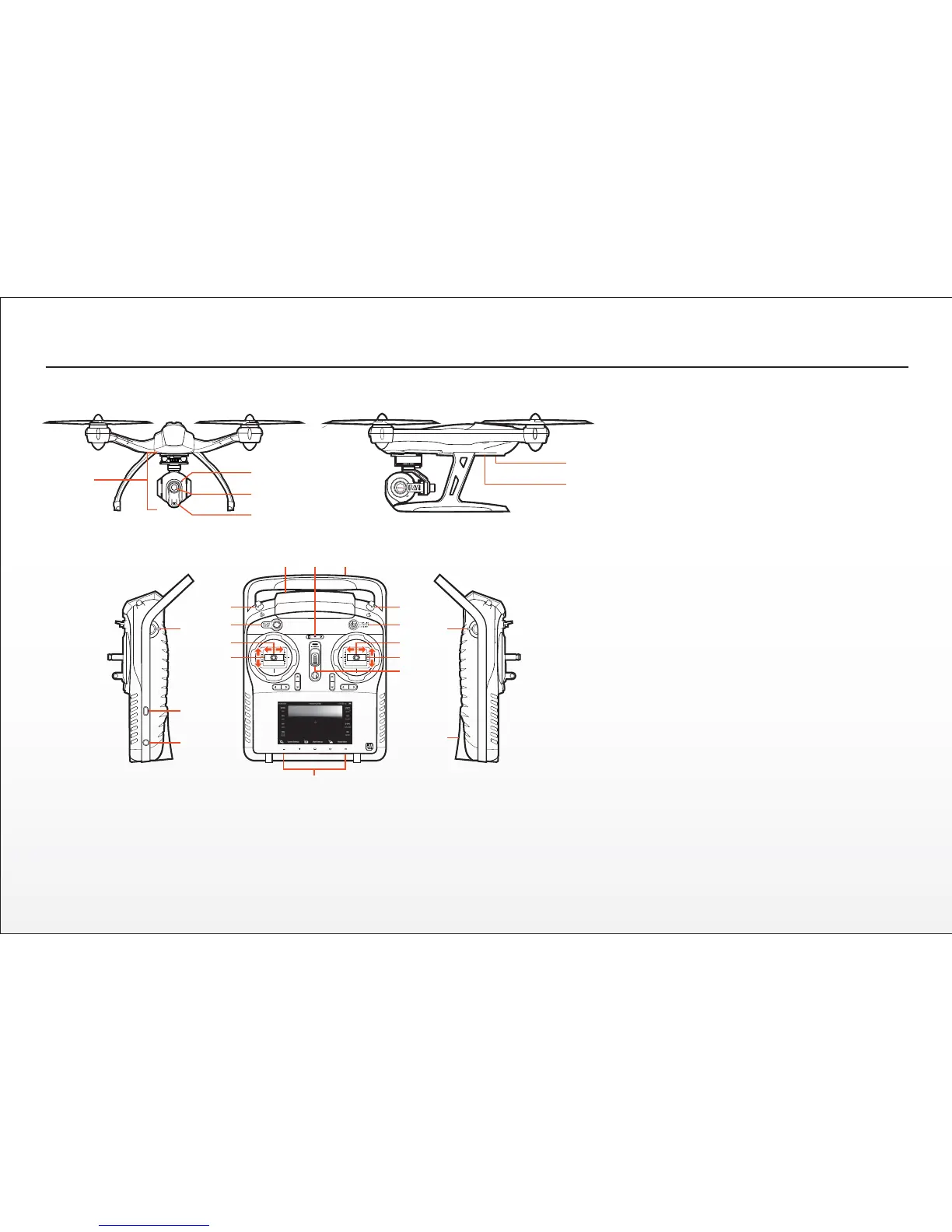
Q500, CGO2-GB AND ST10 OVERVIEW
Q500 / CGO2-GB
1 CGO2-GB Gimbal Camera
2 Camera LED Status Indicator
3 Camera Lens
4 5.8GHz Antenna
5 Main LED Status Indicator
6 Power Switch
ST10
7 Proporonal Control Rate Slider
8 USB Connector/Charging Port
9 Audio/Earphone Jack
10 Take Sll Photo Buon
11 Start/Stop Motors Buon
12 Rudder/Yaw Control (for Mode 2 and Mode 1)
13 Throle/Altude Control (for Mode 2)
Elevator/Pitch Control (for Mode 1)
14 5.8GHz Antenna (located inside the case)
15 Status Indicators (for ST10 baery, 5.8GHz WiFi
and GPS)
16 2.4GHz Antenna (located inside the handle)
17 Start/Stop Video Recording Buon
18 Flight Mode Selecon Switch
19 Aileron/Roll Control (Mode 2 and Mode 1)
20 Elevator/Pitch Control (Mode 2)
Throle/Altude Control (Mode 1)
21 Power Switch
22 Volume and Navigaon Touch-Acvated Buons
(Volume Down/Volume Up/Menu/Home/Back)
23 CGO2-GB Pitch Angle/Posion Control Slider
24 SD Card Slot (located under the baery)
The ST10 is equipped with an internal cooling fan and components that deliver vibrang and
audible alerts.
IMPORTANT NOTE: Although the ST10 is equipped with digital ‘trims’ (located below the control
scks) they are not acve/funconal when controlling the Q500.
1
2
3
4
5
6
7
8
9
10
11
12
13
14 15 16
17
18
19
20
21
23
24
22
10


 To Next Page