11
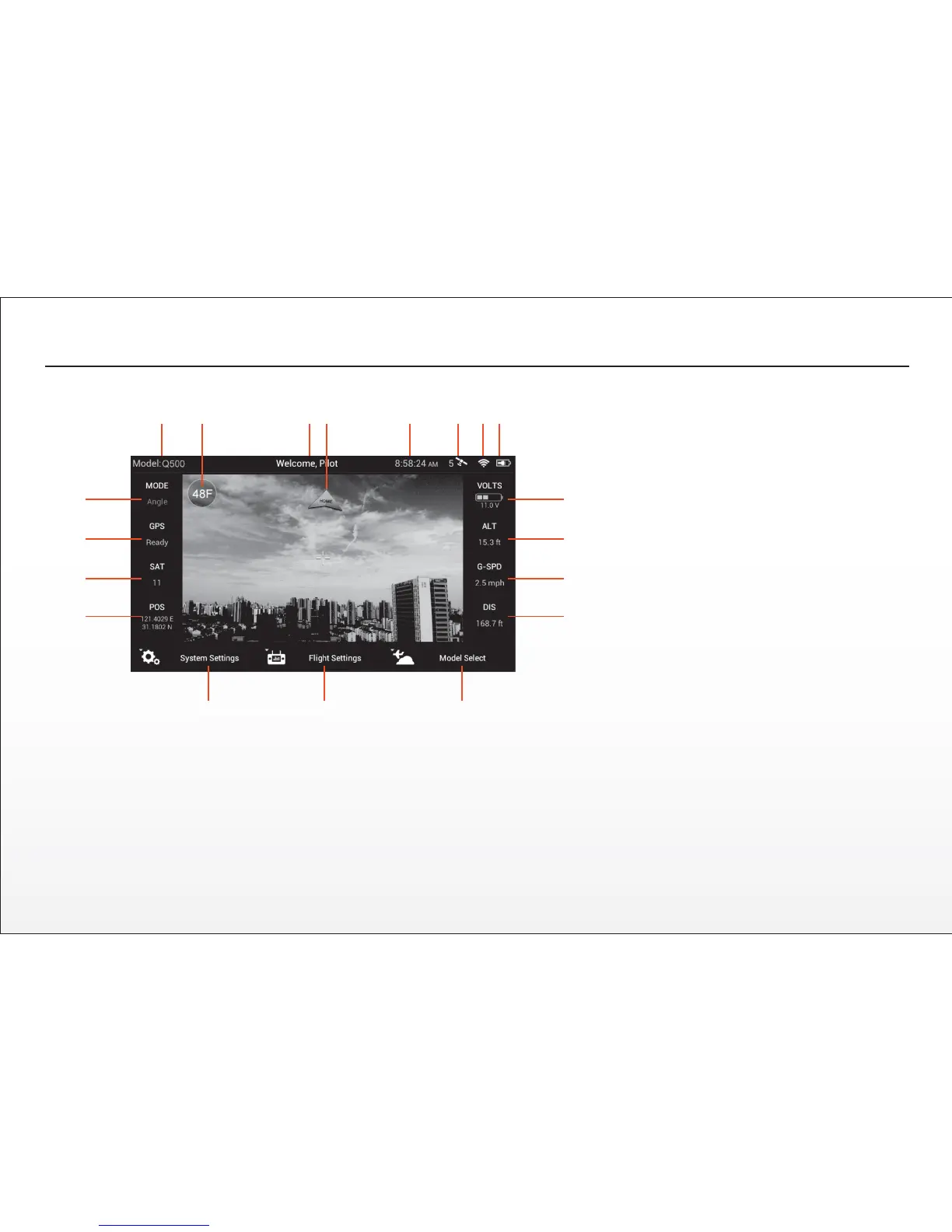
ST10 DISPLAY
1 Model Name
2 Frames Per Second for Video Recording Buon
3 Status Informaon
4 Direcon to Home Point
5 Clock/Current Time
6 GPS Status and Number of Satellites for ST10
7 5.8GHz WiFi Video Link Status
8 ST10 Baery Charge Level Status Icon
9 Aircra Baery Voltage
10 Altude of Aircra (Above Ground Level)
11 Ground Speed of Aircra
12 Distance of Aircra from Home Point
13 Model Select Menu Buon
14 Flight Sengs Menu Buon
15 System Sengs Menu Buon
16 Latude/Longitude Posion of Aircra
17 Number of Satellites for Aircra
18 GPS Status for Aircra
19 Flight Mode of Aircra
The ST10 is equipped with a touchscreen display that allows for changing various sengs and viewing real-me telemetry data and streaming video during
flight.
QUICK TIP: Double tap on the screen to increase the size of the video viewing area to full-screen and double tap again to return to the standard size).
WARNING: NEVER aempt to fly the Q500 via First-Person View (FPV). There’s a slight ‘lag’ in the CGO2-GB streaming video downlink to the ST10, and
as a result the streaming video/FPV should only be used for aligning camera shots and not for flying! Aempng to fly via FPV can result in a crash that will
cause damage to the product, property and/or cause serious injury.
IMPORTANT NOTE: Streaming video from the CGO2-GB to the ST10 and to a separate phone/tablet (or another Yuneec transmier/personal ground
staon) at the same me is NOT recommended as it will result in a very significant lag in the video downlink.
9
10
11
12
19
18
17
16
1415 13
6521 3 4 87


 To Next Page