USER GUIDE
Control Operation
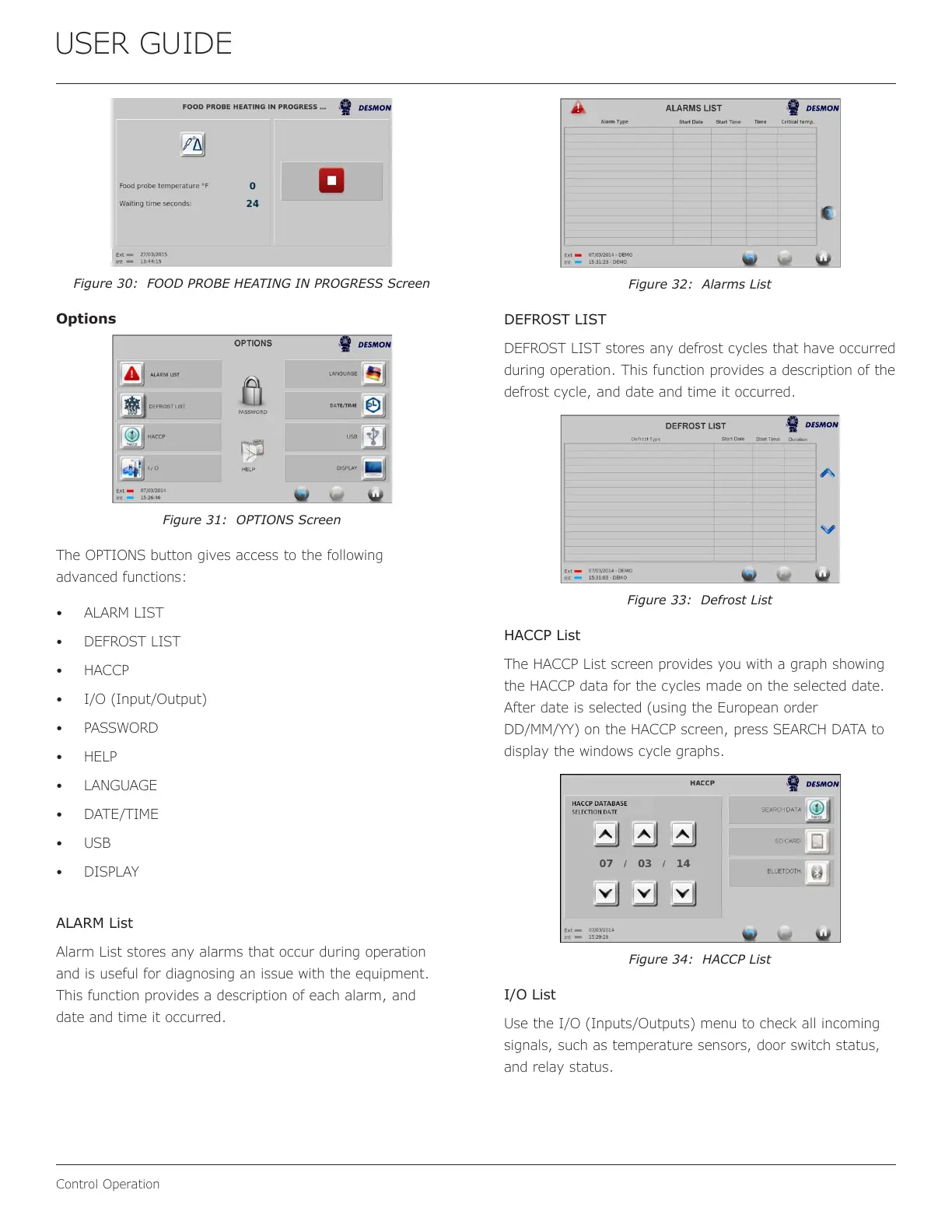
Figure 30: FOOD PROBE HEATING IN PROGRESS Screen
Options
Figure 31: OPTIONS Screen
The OPTIONS button gives access to the following
advanced functions:
• ALARM LIST
• DEFROST LIST
• HACCP
• I/O (Input/Output)
• PASSWORD
• HELP
• LANGUAGE
• DATE/TIME
• USB
• DISPLAY
ALARM List
Alarm List stores any alarms that occur during operation
and is useful for diagnosing an issue with the equipment.
This function provides a description of each alarm, and
date and time it occurred.
Figure 32: Alarms List
DEFROST LIST
DEFROST LIST stores any defrost cycles that have occurred
during operation. This function provides a description of the
defrost cycle, and date and time it occurred.
Figure 33: Defrost List
HACCP List
The HACCP List screen provides you with a graph showing
the HACCP data for the cycles made on the selected date.
After date is selected (using the European order
DD/MM/YY) on the HACCP screen, press SEARCH DATA to
display the windows cycle graphs.
Figure 34: HACCP List
I/O List
Use the I/O (Inputs/Outputs) menu to check all incoming
signals, such as temperature sensors, door switch status,
and relay status.
25


 To Next Page
 Loading...