UAV-1002156-001
ECCN 7A994 Page 25 | 31
2. Programming of the SkyEcho 2 is complete. You can disconnect
your computer or mobile device from the Wi-Fi hotspot.
9 Normal Operation
9.1 Battery Pack / Charging
The integrated battery pack needs to be fully charged before use.
Connect the USB-C cable to the connector on the bottom of the SkyEcho 2
in order to charge the battery. The BLUE LED will remain lit during
charging, and will extinguish when the battery is fully charged.
9.2 Power On/Off
Press and hold the momentary power switch for approximately 3 seconds
to power the SkyEcho 2 on.
Press and hold the momentary power switch for approximately 3 seconds
to power the SkyEcho 2 off.
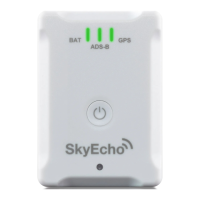
9.3 Indicators
There are a 3 LEDs visible through the top cover of SkyEcho 2.


 To Next Page