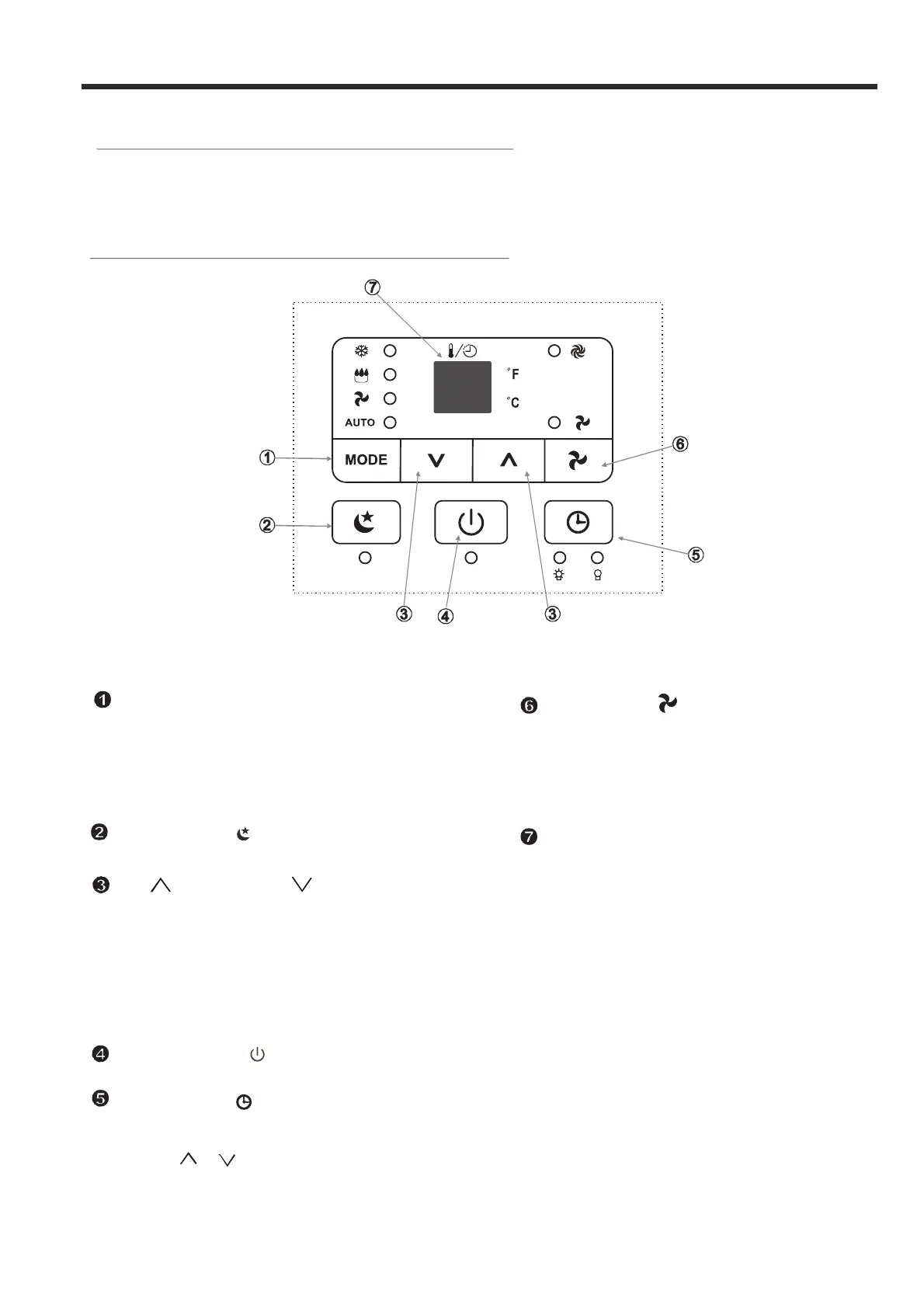
Befo re you begin, th oroughly familia rize yourself wit h the control pa nel and remote control
and all its functions, then locate the symbol for the fu nctions desired.
Th e uni t can be co n tr o ll ed b y the u ni t contr o l pan el alo ne or w i t h the r em ot e control.
ELECTRONIC CONTROL OPERATING INSTRUCTIONS
CONTROL PANEL OF THE AIR CONDITIONER
Used to initiate the SLEEP function.
SLEEP button
AIR CONDITIONER FEATURES
Use to select the desired
operating
mode.
Each time yo u press the button, a mode
is selected in a sequence that goes from
AUTO, COOL, DRY,and FAN. The mode
indicator light
illuminates under the different
modes (Fig.3).
MODE se le c t
Used to initiate the AUTO ON start time and
AUTO OFF stop time program, in conjuction
with the & buttons.
TIMER
Used to turn the power off or on.
POWE R
button
button
button
Sh ows th e s et temperature in C
O
" "
" "
or
F an d the Aut o-timer settings.
When in DRY and FAN modes, it sh ows
th e room te mperat ure.
O
LED Di s p lay
E2-
E4-
Evapo rator temperatu re sens or erro r-
Unplug the un it and plug it ba ck in.
If error repeats, call fo r servic e.
error-
Unplug the un it and plug it ba ck in.
If error repeats, call fo r servic e.
Display panel commu nication
Error cod es:
E1- Room temperatu
re s ensor error-
Unplug the unit and plug it back in.
If error repeats, call for service.
Fig.3
5
O
Used to adjust (increase / decrease)
in a range of 17°C~30°C or 62°F~88°F or
the TIMER setting in a range of 0~24hrs.
UP ( ) and DOWN( ) button
NOTE:
The screen can display temperature in Fahrenheit or
Celsius degrees. To convert from one to the other, press
and hold the Up and Down buttons at the same time, for 3
seconds.
temperature settings(1 C/2 F increments)
O
FAN bu t t on
Controls the fan speed. Press to select the fan
speed from three speeds: LOW, HI and AUTO.
The fan speed indicator light illuminates under
different fan settings except AUTO speed. When you
select AUTO fan speed, all fan indicator lights turn
off.



 To Next Page