10
www. udggear.com
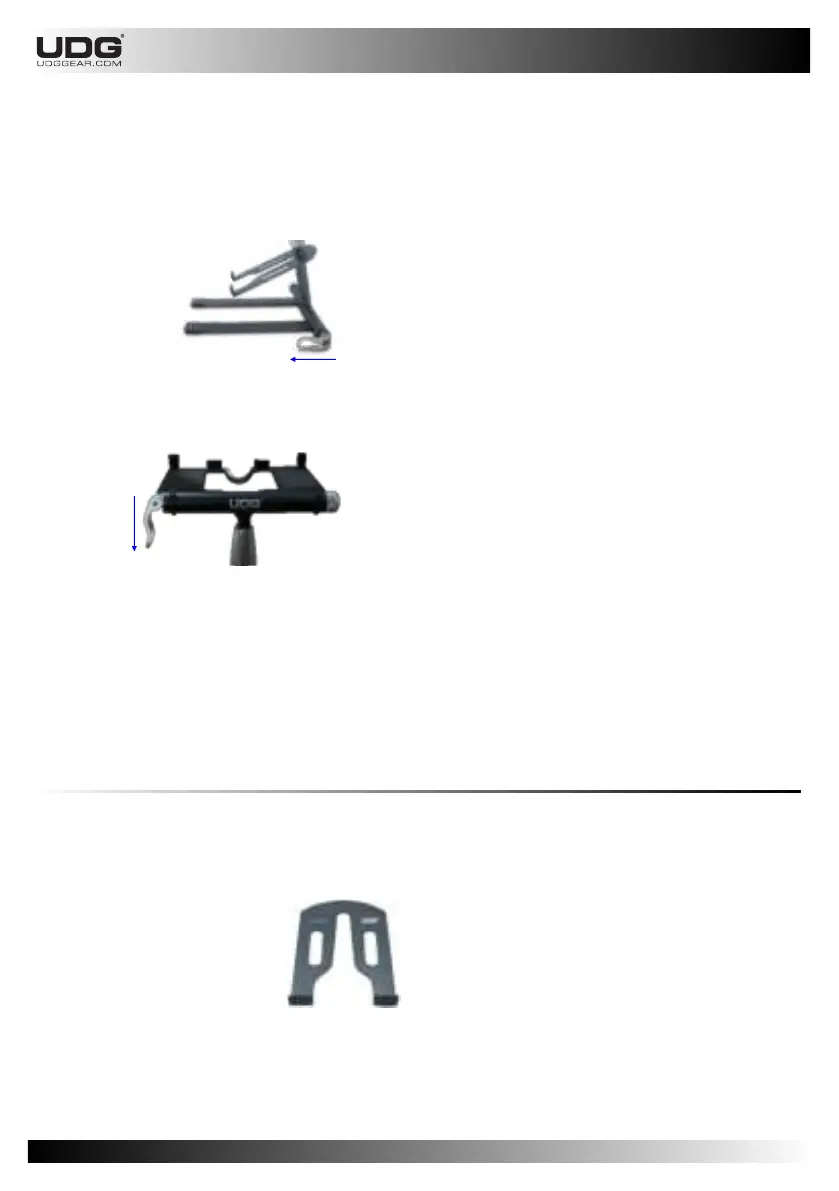
There are two positions of the Clamp Lever that must be followed :
1. On the bottom Leg. The Lever Clamp position should be parallel with the Leg.
See picture below :
2. On the top Main Tray. The Lever Clamp should be positioned downward.
See picture below :
The aluminium Sub Tray of UDG laptop/Controller Stand is special. It was light and removeable.
Once you have it set, it will precisely positioned and affordable to hold a specific weight of the
DJ’s equipment.
CAUTION: DO NOT put equipment which exceed dimension than the Sub Tray.
NOTE: Ignoring this caution can cause falling object or gear.
2.1.4.3 Sub Tray
CAUTION: This is recommended bottom Lever Clamp
position.
CAUTION: This is recommended top Lever Clamp position.
CAUTION: NEVER attempt to loose or unlock the Lever Clamp while your gear is on the stand.
Please always set yout UDG Laptop/Controller Stand before you start to put the laptop or gear on
the stand.
NOTE: Ignoring either of these cautions will void the warranty and could result in damage to UDG
Laptop/Controller Stand or gear.


 To Next Page