www. udggear.com
CAUTION: NEVER attempt to adjust any component position without first unlocking the Lever Clamp.
CAUTION: NEVER unlock the Lever Clamp or attempt to adjust position while your gear is on the
stand.
NOTE: Ignoring either of these cautions will void the warranty and could result in damage to UDG
Laptop/Controller stand or gear.
2.1.3 Positions
This UDG Laptop/Controller Stand offers an unlimited combination of angle settings giving the
user absolute freedom to achieve comfort and reliability.
NOTE: KNOW YOUR PRODUCT. It is incredibly important to take a few minutes to find the desired
position. We recommend trying all position, adjust, until you find the most comfortable position
for you to put your gear on it.
After you have found the desired position, we recommend practicing the adjustment procedure
mentioned later in this manual.
2.1.3.1 Open
The upright position is the standard position that we recommend for most laptops and other
equipment.
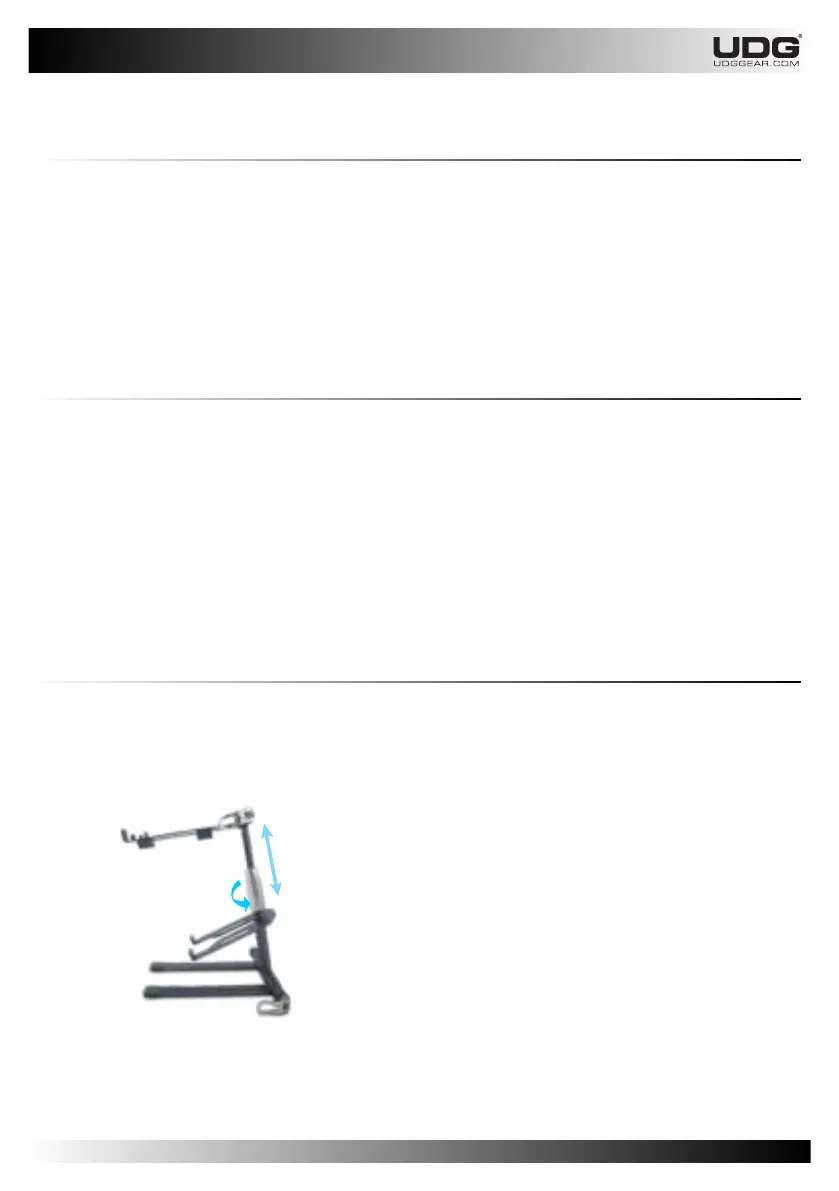
You can always adjust the height of your UDG
Laptop/Controller Stand, for your most comfortable
position.
Rotate the Height Fastener to loosen or tighten so you
can adjust the height level of your UDG Laptop/Controller
Stand. Rotate clockwise to tighten. Rotate counter
clockwise to loosen.
CAUTION: The maximum height adjustment of UDG
Laptop/Controller Stand when fully extended is 47 cm.
NEVER increase the height level above it.
NOTE: Ignoring the maximum height level can cause
instability of the UDG Laptop/Controller Stand and could
result falling object or gear.
2.1.3.2 Upright Position
Max. 47 cm
Rotate to loosen or tighten
7


 To Next Page