2. Operation of UDG Laptop/Controller Stand
2.1 Operation Procedures
6
www. udggear.com
This section guides you in operating UDG Laptop/Controller Stand. If you Should require additional
assistance, please feel free to contact UDG customer service.
First when you receive your order, check the shipping container condition. If the shipping
container appears damages in any way, contact the shipping company immediately. Keep all
damaged packing materials to assist in liability for damage.
Carefully inspect your UDG Laptop/Controller Stand while you unpack. If any damages is noted, or
if parts appear to be missing, email UDG customer service at .
info@udggear.com
2.1.1 Unpacking and Inspections
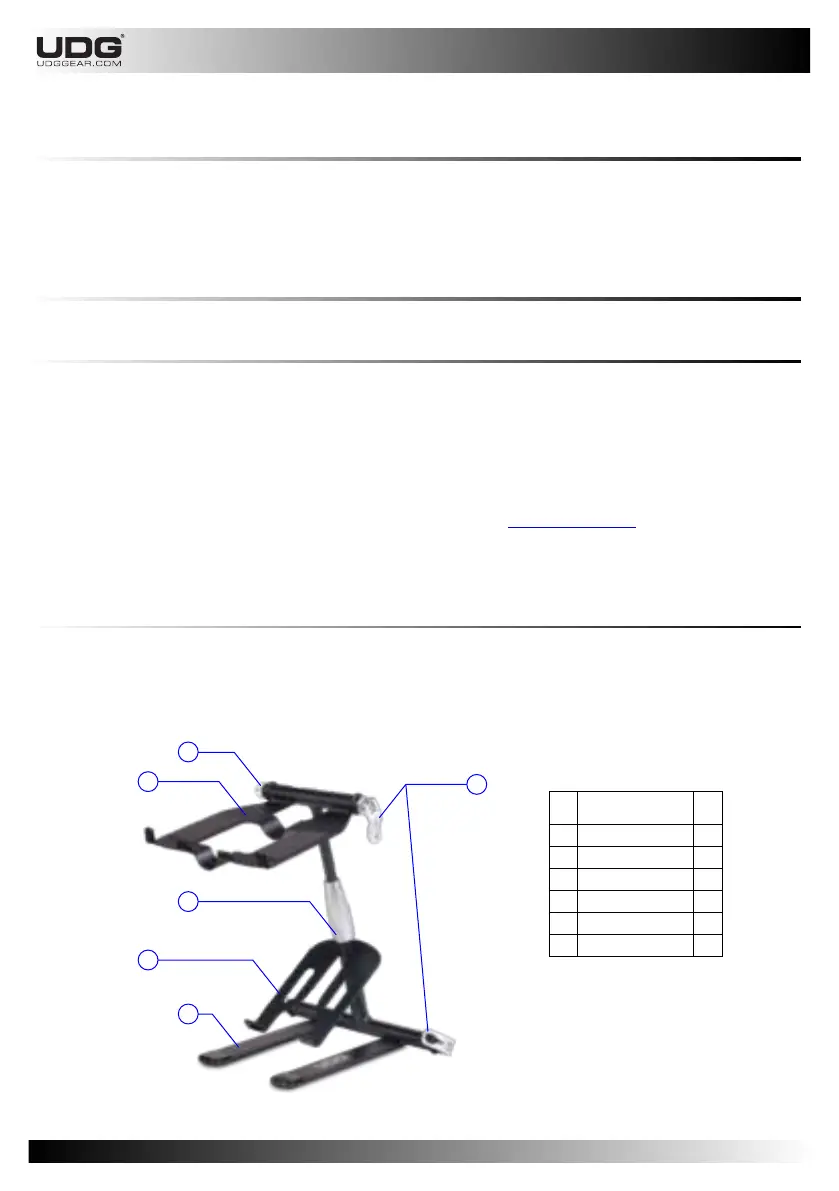
Now that you have unpacked your UDG laptop/Controller Stand, take a moment to familiarize
yourself with your new UDG Laptop/Controller Stand and all of the components.
2.1.2 Parts Included
No.
6
5
1
2
4
Item Description
Qty
1
Main Tray
1
2
Sub Tray
1
3
Lever Clamp
2
4
Leg Assembly
2
5
Knob Assembly
2
6
Height Fastener
1
3


 To Next Page