Ready Before Take Off
Drone preparation
Charging Instruction
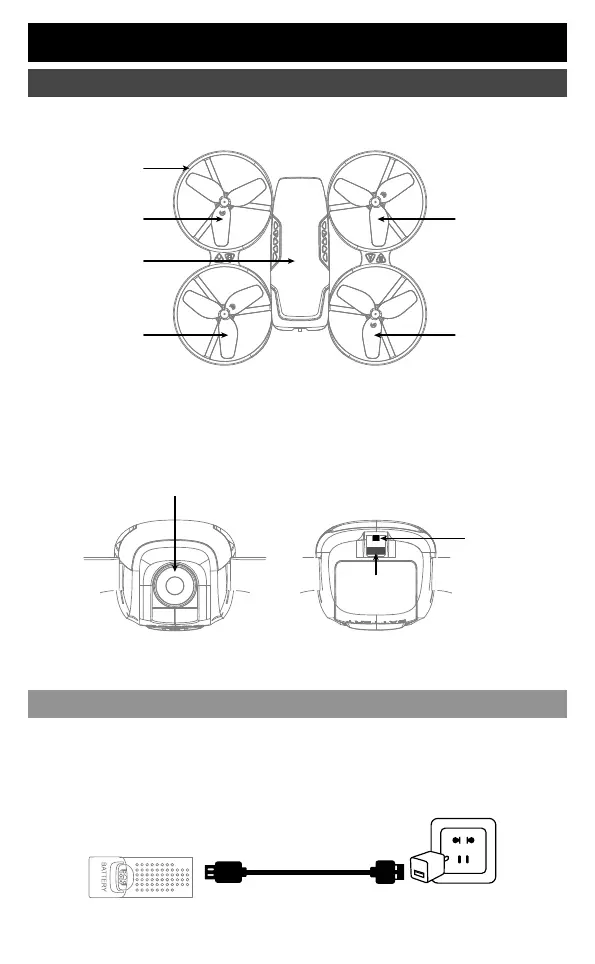
ON OFF
Power
Switch
Drone LED
Camera
Main frame
Propeller A
Propeller A
Propeller B
Propeller B
Front (Prow)
Front (Prow)
Rear (Tail)
Rear (Tail)
Drone Cover
Housing
②①
Battery power is insufficient in the original plant. It must be charged saturated before it
can be used.
Connect the original charging cable with the drone, and then connect other USB charging port. The
drone red LED keeps bright when charging and the light turns green when fully charged. The drone
power button should be turned off when charging.
Original Charging Cable
Drone battery
▲ Only use the original charging cable; suggest select Adapters with output current of 5V 2A.
USB adapter
(Not included)
02



 To Next Page