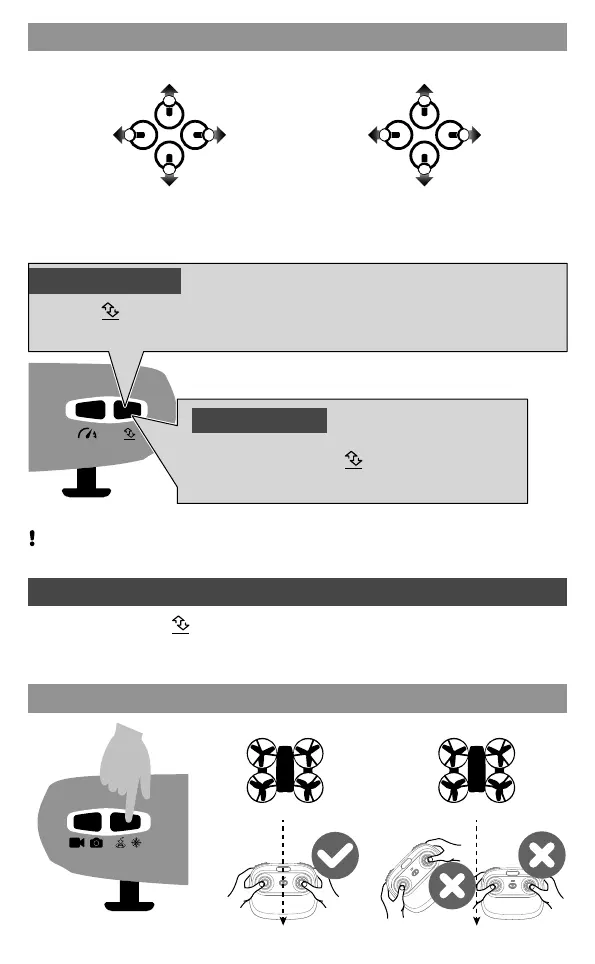
Control stick operation
Front
Rear
Front
Rear
Return Home
Take Off
Landing
Press the " " button, the drone will automatically rises and flies at an altitude of about 1.2m.
During the flight, press the " " button, the drone will
land slowly until landing.
Don’t operate the left stick during landing, otherwise the current command will automatically fail.
Tip: Do not use the emergency stop function unless in emergency situation.
Emergency Stop
During the flight, press " " for about 2 seconds, the transmitter will sound "di. di..." and the
drone crashes directly.
/ /
05
Counter-
clockwise
turn
Clockwise
turn
Go up
Go down
Fly to
the left
Fly to
the right
Forward
Backward
Left stick Right stick


 To Next Page