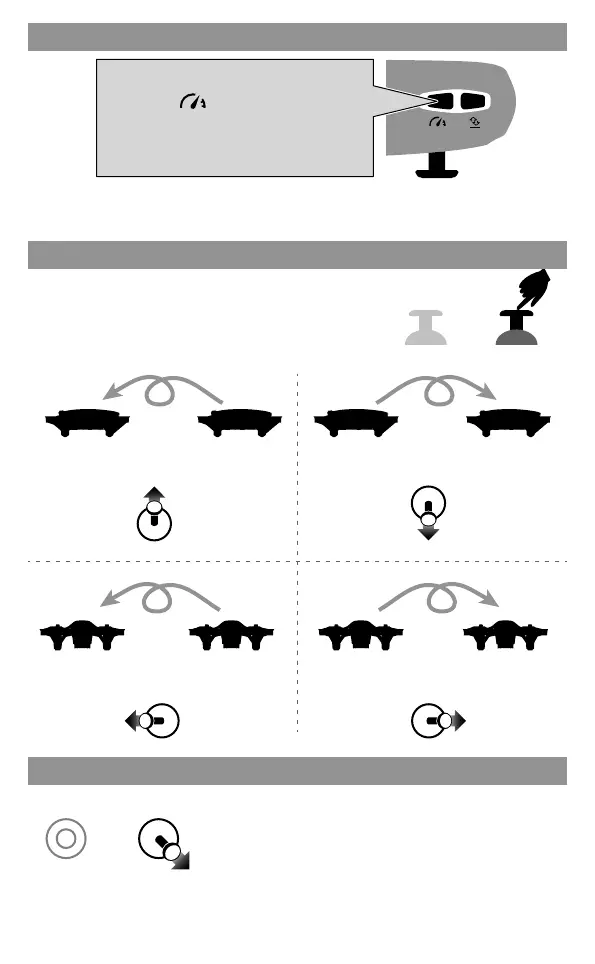
Press down
Speed Switch
Flips
During the flight, short press down the right stick in
the center button, and push the right stick
upward/downward/left/right, the drone will complete
a roll operation.
Roll backwardRoll forward
Front Rear Front Rear Front Rear Front Rear
Roll left
Left RightLeft Right Left RightLeft Right
Roll right
Tips: When the drone is fiercely impacted or crashed, it may cause the gyro can not recover and
cause difficult control, if so, you can re-pairing & re-calibrateand put the drone on the level surface.
After successful frequency alignment, the right stick is pushed to
the lower right corner by 45°, and the drone LED turns to keep
bright after quick flashing, indicating that the gyroscope has been
calibrated. Release the right stick.
Drone calibration (When abnormal flying)
Low speed: suitable for beginners to practice without wind.
High speed: suitable for skilled and professional operation in outdoor wind resistance.
Low speed default
Press the " " button, the transmitter
will sound "di.di", to enter High Speed Mode
"H".Press again, the transmitter will sound
"di", to enter Low Speed Mode “L”.
07


 To Next Page