Transmitter Preparation
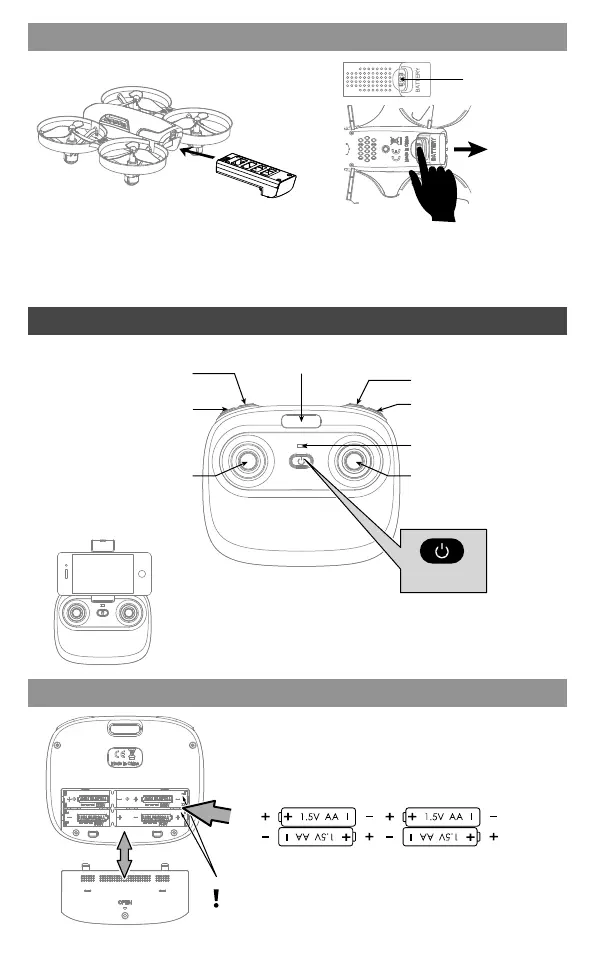
Power-LED
Phone Holder Jack
Left Stick
Right Stick
Speed Switching
Take Off / Landing
/ Emergency Stop
Return Home /
Heading Hold Mode
Video/Photo
Flip(Press Down)
Trimmer(Press Down)
Phone
(not include)
Notice:
Taking photo and recording video are available
after connecting with smart phone.
4×1.5V AA Battery
Battery cover
Back
Open the battery cover of the remote controller
and place the same type of battery with saturated
capacity, according to the '+-' electrode indication
in the battery cell (Not include).
Battery installation
Battery Installation
Battery buckle
Press the battery button and
pull the battery back.
Disassembly:
Put the battery into the battery
compartment and push it into
position.
Installation:
Power Switch
03
Note Direction.



 To Next Page