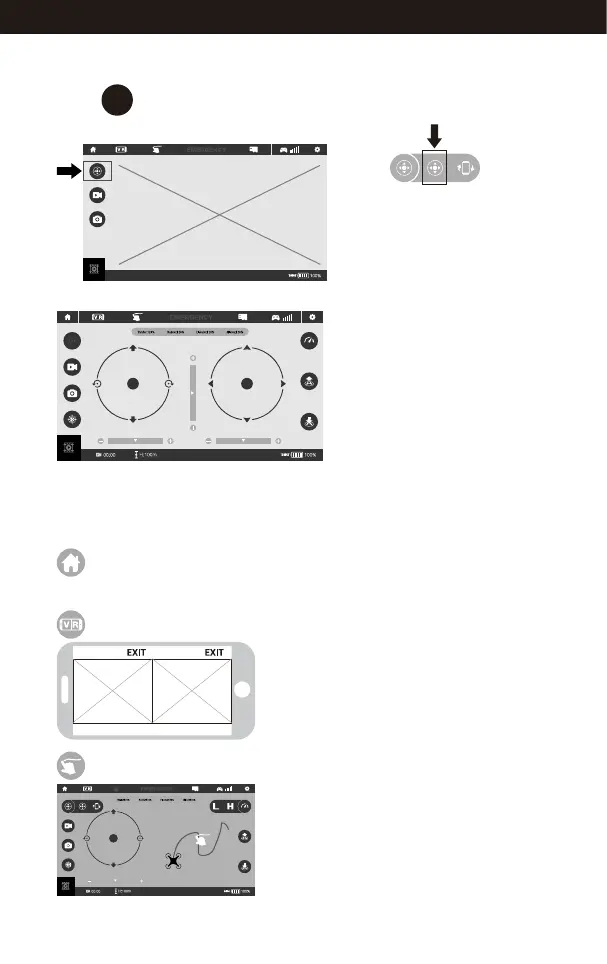
Introduction to the APP Icons
Home Page Icon
Tap to go back to the Home Page.
Tap this icon to enter Virtual Reality Mode to
experience first person view ( only available
when using a VR headset). Tap again to exit
from Virtual Reality Mode.
Virtual Reality Mode
Tap this icon to enter Flight Route Setting Mode.
Draw a flight route in the right area. The drone
will fly according to the flight route. Tap again
to exit from this mode.
Flight Route Setting Mode
image image
Virtual Control Interface
Select to enter the remote control interface for real time transmission.
Learn all the APP
icons first
3
pop-up window.
Enter to the virtual remote interface,
the drone body LED lights change
from flashing to solid, indicating
that the paring is successful and
the drone is ready for fly.
Frequency Pairing
Real time Transmission Interface
Tap the icon in
17
www.udirc.com



 To Next Page