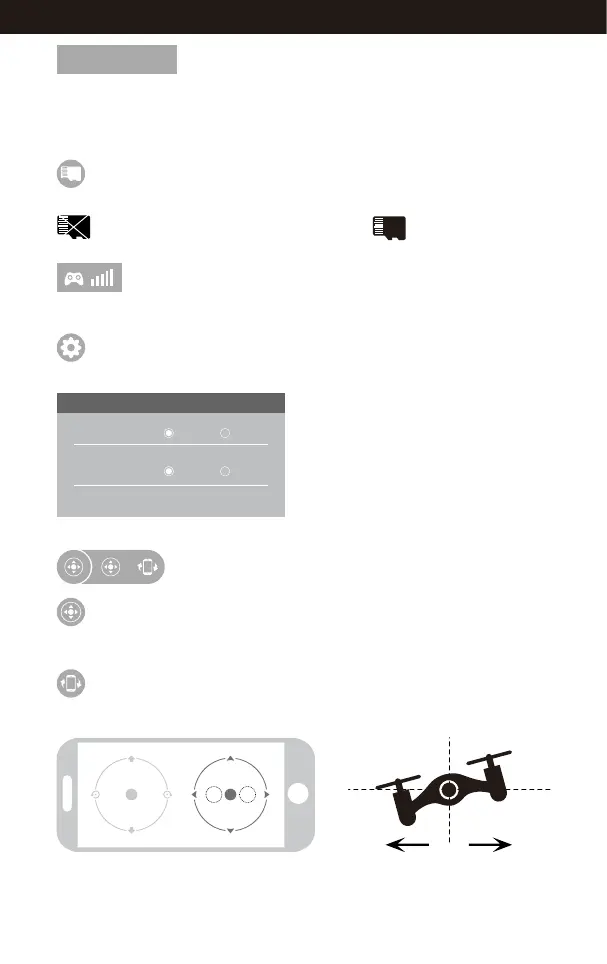
The icon is red by default. Tap this icon and the propellers will stop immediately.
The drone will fall straight to the ground. Do not use the EMERGENCY function
except in an emergency.
EMERGENCY
EMERGENCY
To show the strength of WiFi signal of the drone.
Remote Control Signal
When TF card has not been inserted to the drone camera, then the icon will show
, when the TF card is in, then the icon shows .
TF Card Icon
Tap this icon to set parameters. Tap again to exit.
Tap “Save” to save trimmer setting.
Tap”Reset” for factory reset.
Select the picture transmission resolution.
Setting
SETTING
Trimming Save Reset
Transmission quality 720P 480P
The choice of Remote Control Mode
Remote Control
The virtual remote controller is hidden by default. Tap the icon to display
the virtual remote controller.
Tap this icon to enter Gravity Induction Mode. Tilt the phone to fly left / right
and forward / backward. Tap again to exit from Gravity Induction Mode.
Gravity Induction Mode
If the mobile phone tilts to the left / right, the Right Ball will
move accordingly enabling the drone to fly left / right.
18
www.udirc.com



 To Next Page