Notice:
1. If you can not find the Wi-Fi signal to connect, turn off Wi-Fi and turn on
again to search and connect.
2. The available Wi-Fi control radius/distance is 20m, please control the
drone within this range.
3. When alternating control from mobile phone to transmitter, the
transmitter left stick must be in the center position, or exit from the APP.
If not then you can not control the drone alternately.
Landing
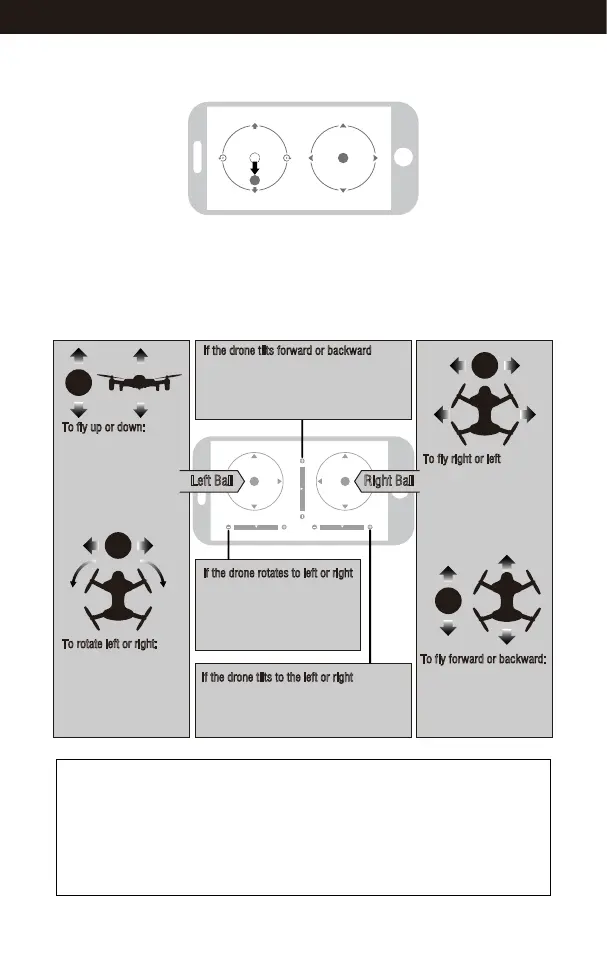
Move the left ball down to the lowest position. The drone will land.
Flying Control
Left Ball Right Ball
To fly up or down:
Move the Left Ball up to fly
up and move the Left Ball
down to fly back down.
The drone will continue flying
at appointed altitude after
release the ball.
To fly right or left
Move the Right Ball to the
left to fly the drone to the
left. Move the right ball to
the right to fly the drone
to right.
If the drone tilts forward or backward
Click the “-”of the Forward /Backward Trim
to adjust the drone if the drone tilts forward.
Click the “+” to adjust the drone if the
drone tilts backward.
If the drone rotates to left or right
Click the ”+” of the Left/Right
Rudder Trim if the drone rotates
left. Click the “-”if the drone
rotates right.
If the drone tilts to the left or right
Click the “+” of the left /Right Flying Trim if
the drone tilts to the left Click the “-”to adjust
the drone if the drones tilts to the right.
To fly forward or backward:
Move the Right Ball up to
fly the drone forward, and
move the Right Ball down
to fly the drone backward.
To rotate left or right:
Move the Left Ball to the
left to rotate the drone to
the left. Move the Left Ball
to the right to rotate the
drone to the right.
21
www.udirc.com



 To Next Page