4.2
Selecting
the
tape
speed
and
switching
the
recorder on
Turn the tape speed selector (17)
to
the
appropriate speed
setting. The recorder will then be switched on, and
the
LED
power indicator (25) will light up.
The table below indicates which speed is recommended
in
various cases.
Tape Speed
15/16ips
1
7/8
ips
33/4
ips
71/2ips
Recording Time
2X4hrs.
2X2
hrs.
2X
1
hr
2X
1/2
hr.
25-6,000
Hz
25-13,000
Hz
20-16,000
Hz
20-25,000
Hz
Application
For recordings
in
which a long recording time is more impor-
tant than tonal quality.
For
recordings
in
which a long
recordin~
time
is
more impor-
tant
than highest tonal quality, althQugh tonal quality should
be very good.
For hi-fj recordings
in
which excellent tonal quality
is
required.
For hi-fi recordings
of
highest tonal quality.
Recordings times refer
to
double-play tape.
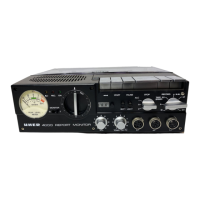
5. Connecting
UHER
4000
REPORT
MONITOR
to
a receiver
or
amplitier
system
tor
record and
playback
For equipment with
DIN
socketry, use UHER inter-unit lead
K
511
or K
541
10
connect the RADIO PHONO socket (4)
01
the
UHER
4000
REPORT
MONITOR
10
the tape input socket
of
the
amplifier, preamplifier/control centre, receiver or tuner.
A mono adapter lead (available
at
audio outlets)
is
required
10
connect
lhe
4000
REPORT
MONITOR to equipment
wilh.
phono jacks. Make certain when connecting
the
equipment
that
the
phono-type plugs for record and playback - they will
have identifying markings - are plugged into
the
proper jacks.
When connecting
UHER
4000
REPORT
MONITOR
10
an
ampli-
fier or receiver with monitor circuitry, connection will also have
to
be made belween the MONITOR socket (2)
01
lhe
recorder
to the monitor input
of
the receiver or amplifier by means
of a second
UHER
K
541
lead (with equipment having a
DIN
socket as monitor input) or a commercially available adapter
lead w(th a
DIN
plug on one end and phono plugs on
the
other end (tor equipment having phono jacks).
29


 To Next Page