Display Messages
DISPLAY DESCRIPTION ACTION
The system is ready to accept a blood sample. Apply a blood sample.
This message is displayed when your meter
has NOT been coded.
Please code the meter according to page 10.
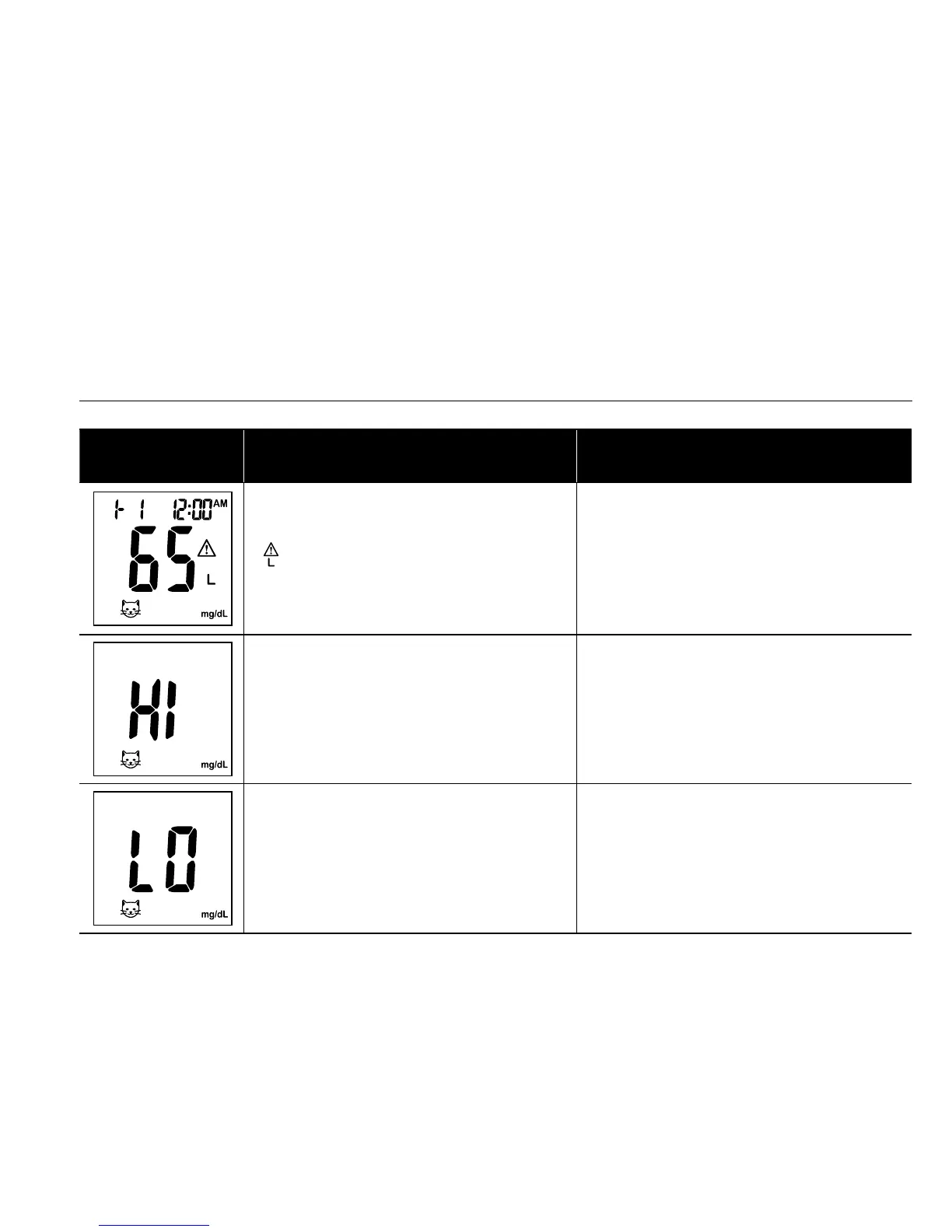
appears when the result is HIGHER
than the “HI” alert setting.
The default setting is 180 mg/dL (9.5 mmol/L)
and it can be changed according to page 12.
Display Messages (continued)
DISPLAY DESCRIPTION ACTION
appears when the result is LOWER
than the “LO” alert setting.
The default setting is 70 mg/dL (3.2 mmol/L)
and it can be changed according to page 12.
Test result is HIGHER than 600 mg/dL
(33.3 mmol/L).
Repeat the test by using a new test strip. If
the same message displays again, the result
is confirmed to be higher than the meter
operating range.
Test result is LOWER than 20 mg/dL
(1.1 mmol/L).
Repeat the test by using a new test strip.
If the same message displays again, the
result is confirmed to be lower than the
meter operating range.


 To Next Page