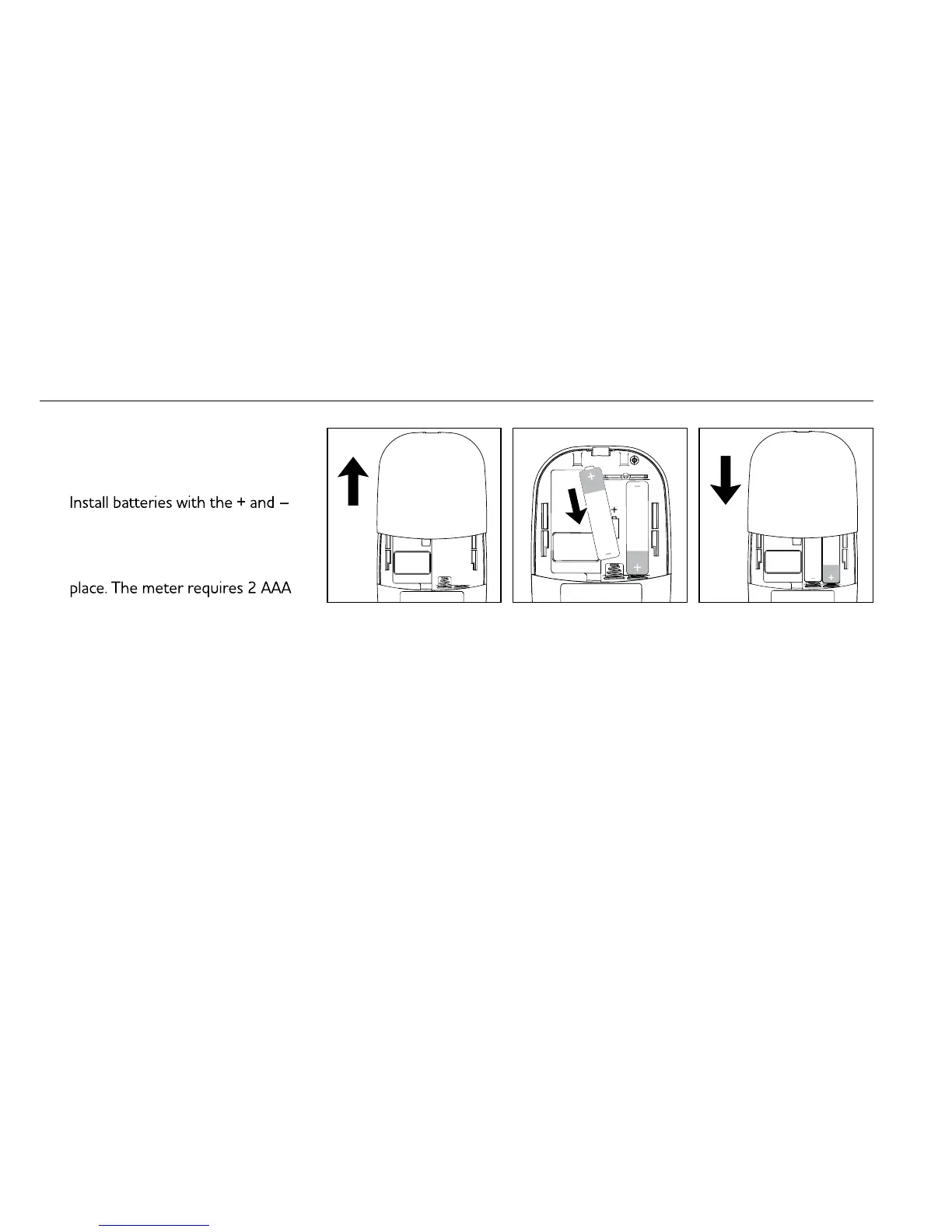
Installing/Replacing Batteries
1. From the back of the meter,
gently slide and remove the
battery cover (Fig.1).
2.
ends matching indication marks
on the battery compartment.
3. Slide battery cover back into
batteries to operate.
Be sure the batteries are properly
installed. The default is set to
instructions to properly set up
the meter.
Setting Year/Date/Time
1.
press and hold
button for
4 seconds to enter setting.
2. Press
or
to select “24hr”
or “12hr”. Press to confirm
(Fig.2).
3.
appear and flash. Press
or
to adjust and press
to confirm
(Fig.3).
4.
appear and flash. Press
or
to adjust and press to confirm
(Fig.4).
5.
appear and flash. Press
or
to adjust and press to confirm
(Fig.5).
6.
appear and flash. Press
or
to adjust and press to confirm
(Fig.6).
7.
appear and flash. Press
or
to adjust and press to confirm
(Fig.8, Fig.9). Press
to turn off
the meter. The meter year/date/
time setting is complete.


 To Next Page