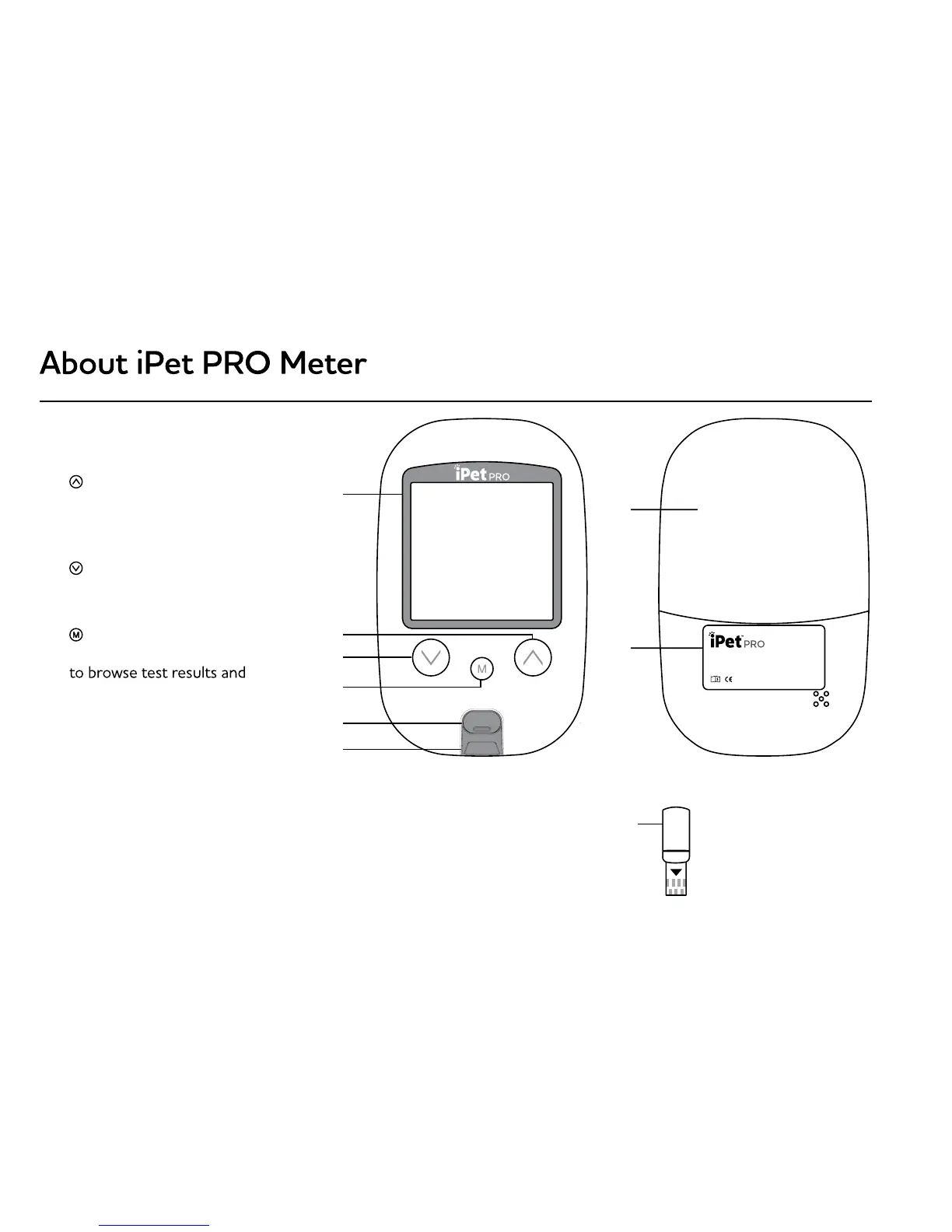
1. Display: To display results in
numbers and icons
2.
Button: Press and hold to
enter reminder alarm and HI/
LO alarm setting, or to adjust
numbers and to toggle settings
3.
Button: Press and hold to
enter buzzer setting or to adjust
numbers and to toggle settings
4.
Button: Press and hold to
enter the year/date/time setting,
averages in memory or to turn
the meter ON/OFF
5. Strip Ejector: Push to eject
the test strip
6. Test Port: Compatible test strips
and glucode chips are
inserted here
7. Battery Cover: To slide open
and closed
8. Meter Label: Manufacturer
information
9. Glucode Chip
1. Memory Icon:
memory mode
2. Year/Date: To display year/date
3. Control Solution Icon:
during a control solution test
and indicates a control solution
test result
4.
an alarm is set
5. Test Result: To display
test results
6. Buzzer Icon:
buzzer is ON
7. Meal Indicator Icon: Pre-meal
and post-meal
8. To select a specified
animal type (
, Hor) prior
to performing a test
9. Battery Icon:
10. Time: To display the time at
11. Code:
is displayed
12. Blood Drop Icon: Flashes
a blood sample
13.
result is out of range
14. Test Strip Icon:
the meter is ready for a test
15. Temperature Icon:
operating temperature
16. Measurement Units: To identify
test result units (mg/dL or
mmol/L )
2
3
4
5
6
7
8
9
Blood Glucose Monitoring System
B05Z102069/REV.0/V002-2016-11
Distributed by UltiMed, Inc., Excelsior, MN 55331
For questions, please call 1-877-854-3434 toll-free
Mon-Fri, 8AM - 4PM CST


 To Next Page