14
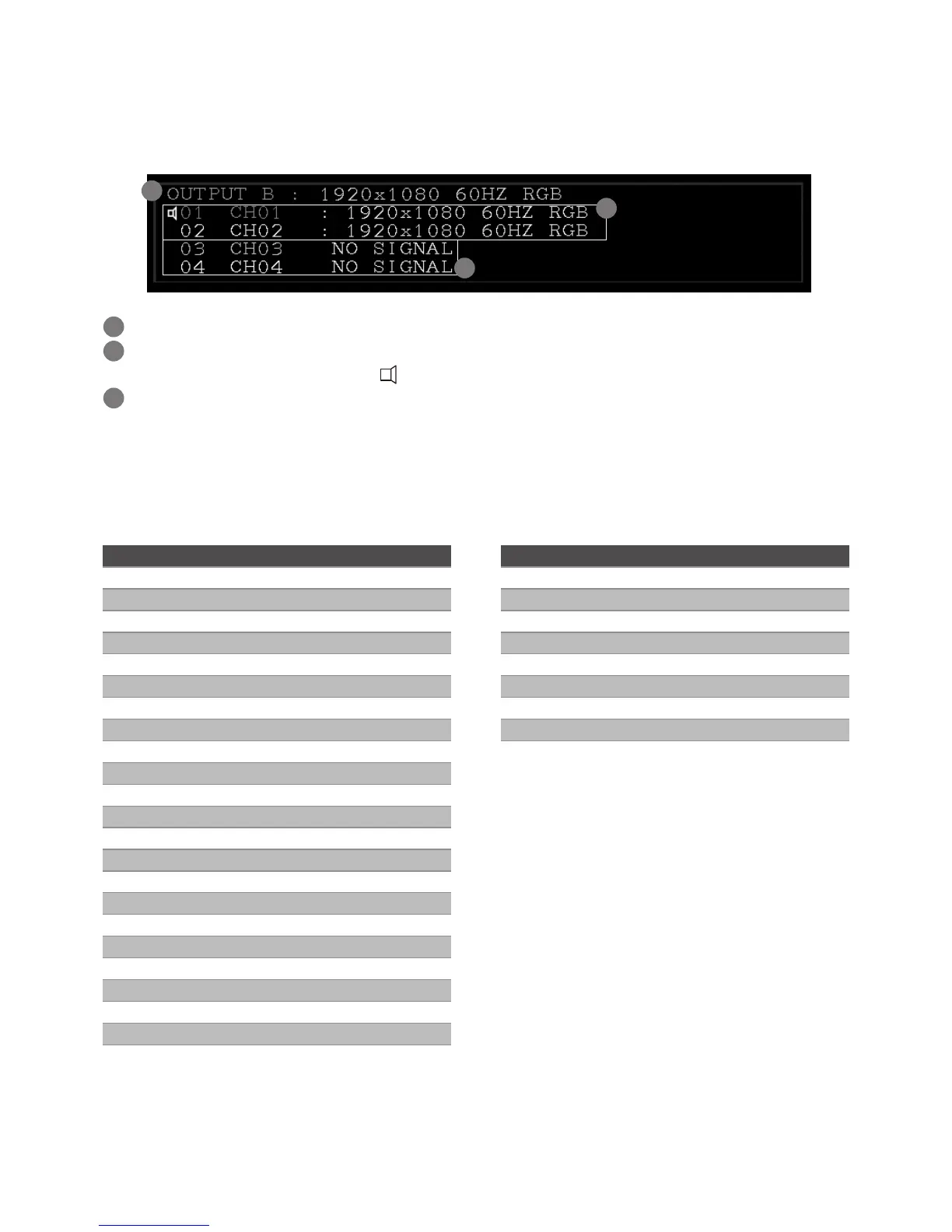
Title bar information
Once the display title bar function has been enabled (refer to Setting page), the related information
will be listed on the upper left of screen. The image below is an example for explanation; the actual
application is depending on your connection.
1
2
3
1
The monitor is showing the image from Output B, and the output resolution is 1920x1080 @60Hz.
2
Image sources have been connected to channel 1 and 2 respectively, and both inputted resolutions
are 1920x1080 @60Hz. The icon of indicates the audio is outputted from this channel.
3
There is no source connected to this input.
Resolution
The tablets below show the input and output resolutions of RH144, if there is a problem of abnormal
display or no video, suggest using a more standard display mode from the list.
Input Resolution Refresh rates (HZ)
640x480 50/59/60/72/75
720x480 (720P) 56/59/60/72/75
720x576 (576P) 50/60/70/72/75
800X600 56/60/70/72/75
1024X768 60/70/72/75
1152X864 50/69/60/75
1280x600 50/59/60
1280X720 (720P) 50/59/60/75
1280X768 50/59/60/75
1280X800 50/59/60/75
1280X960 50/59/60
1280X1024 50/59/60/75
1360x768 50/59/60/75
1366x768 50/59/60/75
1440X1050 50/59/60
1440X900 50/59/60/70/75
1600x900 50/59/60
1600x1024 59/60
1600X1200 50/60
1680x1050 59/60
1920X1080i 25/29/30
1920X1080 (1080P) 50/59/60
1920X1200 50/60
Output Resolution Refresh rates (HZ)
1024X768 60
1280X800 60
1280X1024 60
1360x768 60
1600X1200 60
1680x1050 60
1920X1200 60
720P 50/60
1080P 24/30/50/60


 To Next Page