8
4. IR remote control
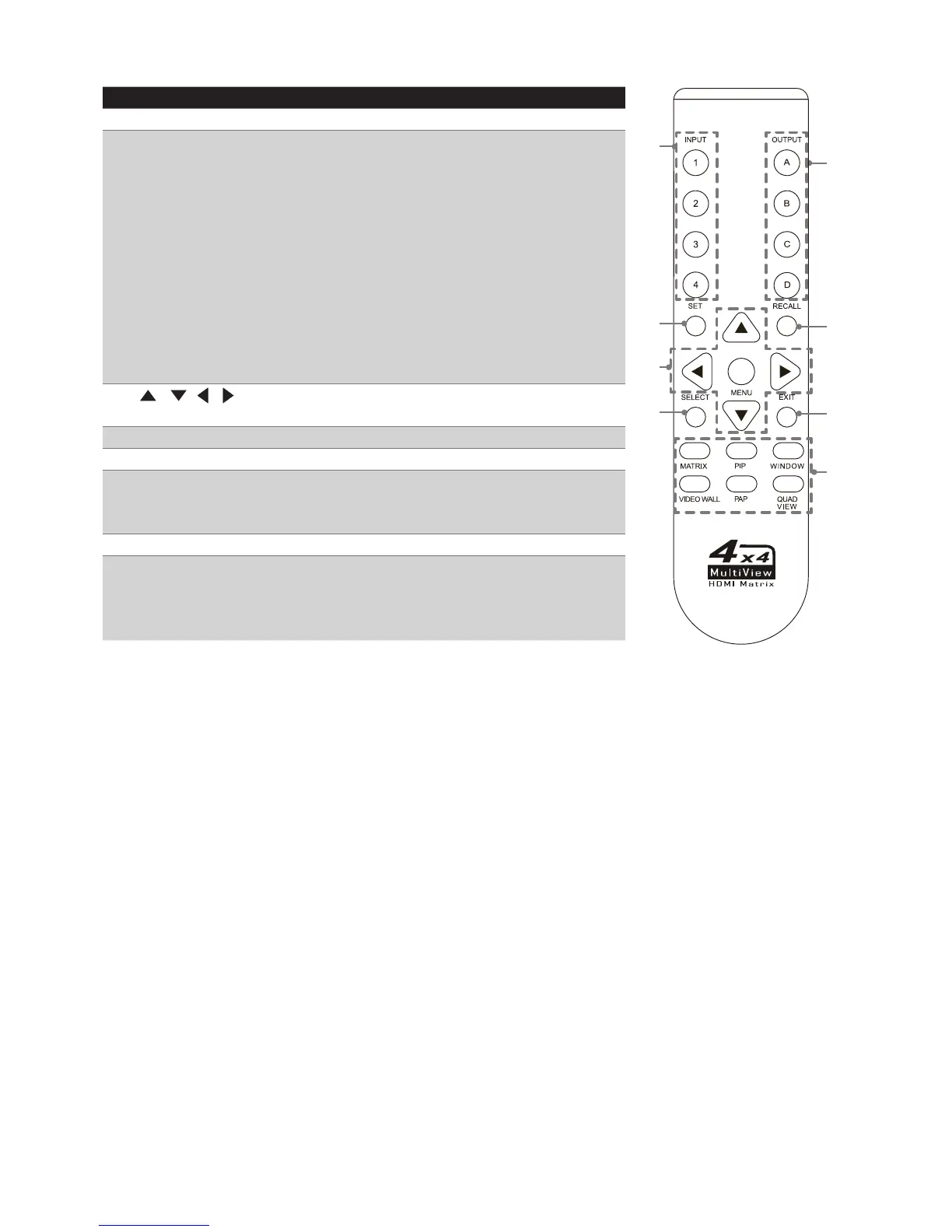
No. Item Description
1 INPUT Press to select the desired source.
2 Set Save the customized input and output up to 8
settings.
1. Select a desired mode by pressing MATRIX/
PIP/WINDOWS/VIDEO WALL/PAP/
QUADVIEW button.
2. Set a preferred input source(1~4 ) and output
display(A~D).
3. Press SET button, then all the buttons of
input(1~4) and output(A~D) on the unit will
be flashed.
4. Press a preferred button(1~4 and A~D) to
save the setting to the memory of unit.
3
/ / /
(Cursor buttons)
Press to move the cursor up, down, left and
right on the menu.
4 Select Select a desired option on the menu.
5 OUTPUT Press to select the desired display.
6 Recall Recall the customized setting. Press to light up
the buttons (1~4 and A~D) of unit, and then
select the preferred mode to recall.
7 Exit Press to exit the OSD menu.
8 MATRIX/PIP/
WINDOWS/
VIDEO WALL/PAP/
QUADVIEW
Select the desired mode you wish to display.
1
2
3
4
5
6
7
8


 To Next Page