EasyManua.ls Logo

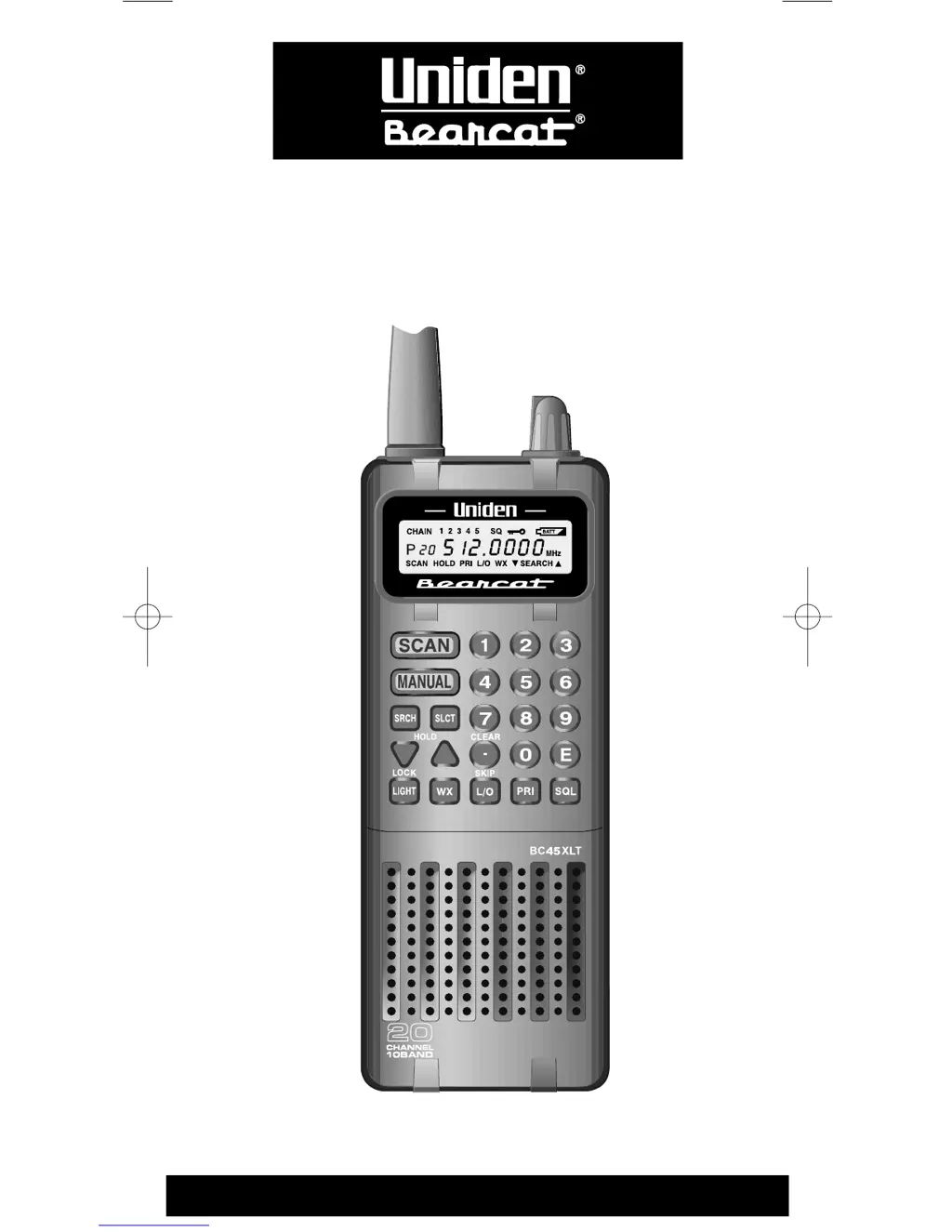
Uniden BC45XLT - User Manual

Uniden BC45XLT
35 pages
Print Icon
To Next Page IconTo Next Page
Loading...
UBZZ01313ZZ
Operating Guide
BC45XLT
Programmable
Hand-Held
Scanner
BC45XLT 11/2/00 9:04 Page i

Questions and Answers

  • M
    Michael NelsonJul 30, 2025
    Why is my Uniden BC45XLT Scanner having improper reception?
    • A
      angelalewisJul 30, 2025
      If you're experiencing improper reception on your Uniden Scanner, try these steps: * Check the antenna connection. * Reposition the antenna. * Move the scanner to a different location. If you are in a remote area, you might need a multi-band antenna. Check with your dealer or local electronics store.
  • C
    czhangAug 6, 2025
    What to do if my Uniden BC45XLT Scanner scan won’t stop?
    • C
      Colleen PerkinsAug 6, 2025
      If the scan on your Uniden Scanner won’t stop, here are some things to check: 1. Make sure the squelch is turned ON. 2. Check the antenna connection. 3. See if too many channels are locked out, as this reduces the scanner's ability to find an active channel. 4. Review each channel’s frequency to ensure it's correctly stored in memory. 5. Consider that none of the programmed frequencies might be active at the moment.
  • P
    Paula FriedmanAug 14, 2025
    Why Weather Scan won’t work on my Uniden BC45XLT?
    • F
      Franklin GreenAug 14, 2025
      If the Weather Scan feature isn’t working on your Uniden Scanner, make sure that the squelch is turned ON and check the antenna connection.
  • C
    Carla TravisAug 22, 2025
    What to do if Uniden BC45XLT scan won’t start?
    • A
      Alicia GreenAug 23, 2025
      If the scan function on your Uniden Scanner won’t start, try pressing the key again. Also, check that the squelch is ON and ensure that not all channels are locked out.

Summary

Scanner Function Keys

Scanner Controls and Indicators

Safety and Usage Precautions

Earphone and Audio Safety

Advises on safe earphone use to prevent hearing damage and volume adjustment.

Environmental and Modification Warnings

Warns against moisture exposure and unauthorized product modifications.

Key Features of the BC45 XLT

Basic Scanner Operations

Squelch Functionality

How to use the squelch to filter out unwanted noise and weak signals.

Keypad Lock Mechanism

Procedure to lock and unlock the scanner's keypad.

Programming Scanner Channels

Frequency Programming Management

Scanner Scanning Modes

Initiating and Managing Scan

Details on how scanning starts, operates, pauses, and resumes.

Advanced Channel Management

Locking Channels During Scanning

How to prevent frequent-stopping channels from interrupting the scan.

Restoring Locked Channels

Restoring All Locked Channels

Method to unlock all previously locked channels simultaneously.

Priority Scan Functionality

Activating and Deactivating Priority Scan

Steps to enable and disable the feature that monitors a priority channel.

Managing Priority Channel Settings

Reassigning the Priority Channel

Procedure to change the designated priority channel.

Chain Search Operations

Setting Search Ranges

Instructions for defining frequency ranges for chain searches.

Chain Search Range Configuration

Entering Frequency Limits

How to input upper and lower frequency limits and handle errors.

Search Hold Functionality

Pausing and Resuming Search

How to pause, navigate, and resume the search process.

Channel Skip Feature

Skipping Interrupting Channels

Procedure to skip frequencies that frequently interrupt scanning.

Unlocking All Skipped Channels

Method to remove all programmed skips simultaneously.

Storing Found Frequencies

Saving Frequencies During Search

Steps to save frequencies discovered during a search into channels.

NOAA Weather Scan

Repairs and Interference

Troubleshooting Common Issues

Problem Resolution Steps

Step-by-step solutions for common scanner operational problems.

Technical Specifications

Warranty Information

Uniden BC45XLT Specifications

General IconGeneral
BrandUniden
ModelBC45XLT
CategoryScanner
LanguageEnglish

Related product manuals