Link to Table of Contents
User Guide
67
User Manual
Select FILE a. PLOTTER MANAGER
Select ADD-A-PLOTTER WIZARD and click NEXT.b.
Select System Printer and click NEXT.c.
Select your Universal Laser System (i.e. VLS6.60) and click NEXT.d.
Click the Edit Plotter Conguration button and select Modify Standard Paper Size (Printable Area).e.
Select User-Dened LANDSCAPE (Modify) and change the margin values to zero.f.
Top = 0.0
Bottom = 0.0
Left = 0.0
Right = 0.0
Click NEXT g. YOUR SYSTEM (i.e. VLS6.60) Next Finish OKAY FINISH
Close out the PLOT STYLES pop up.h.
Select drawing to plot. Objects should be located within specic drawing limits/area for best results.
Click FILE a.
PLOT
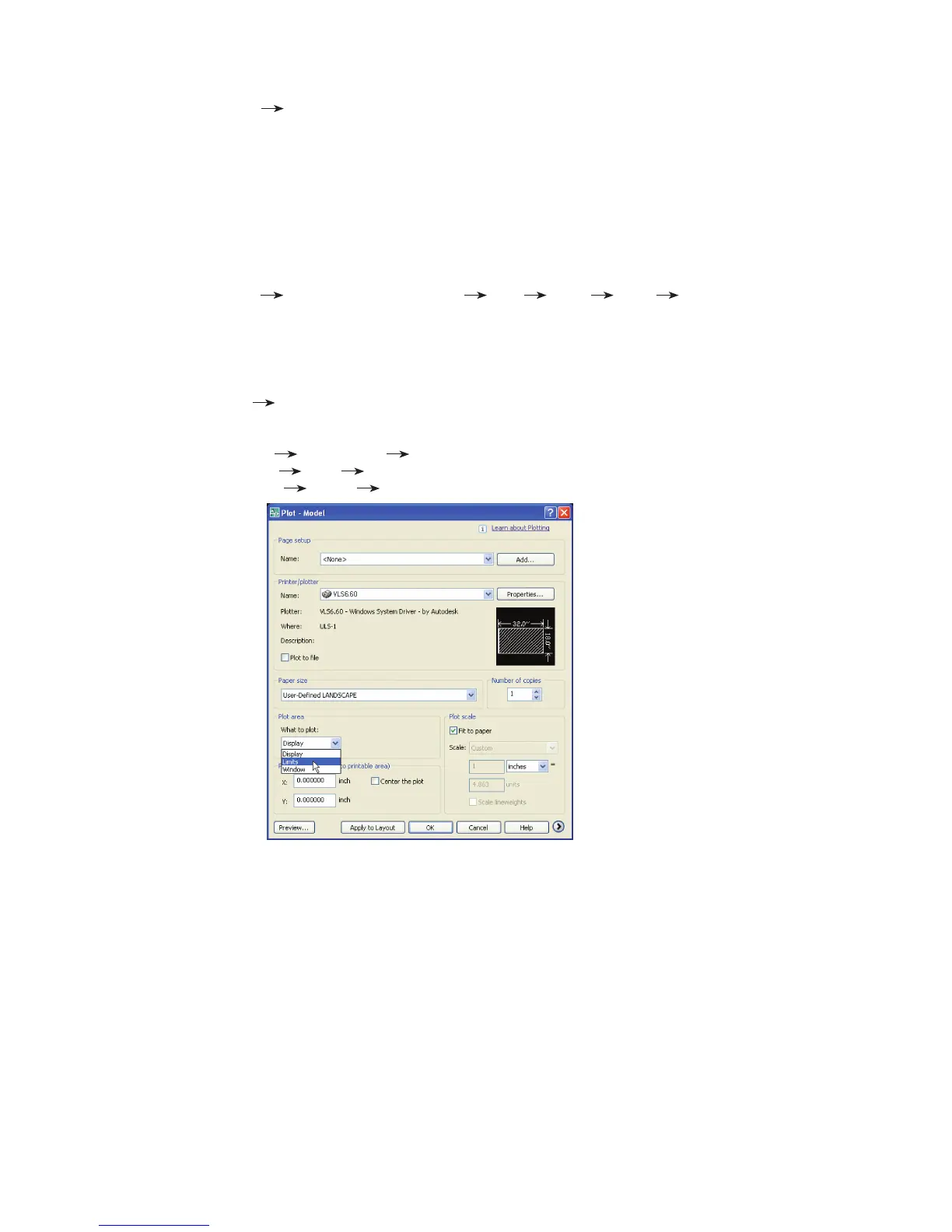
Set Printer/Plotter to your laser system (i.e. VLS6.60)b.
Set Paper Size to User-Dened LANDSCAPE.c.
Set Plot Area d. What to Plot Limits
Set Plot Scale e. Scale 1:1
Set Plot Oset f. X = 0.0 Y = 0.0
Note: Always preview before outputting to laser system.
ADD NEW PLOTTER3.
PLOTTING TO LASER4.



 To Next Page