FAQ and Solution
FAQ and Solution
Q:No touch
1. For mobile phone,there are two cases.
① There is no touch when connecting to a mobile phone supporting USB3.1. Please contact us to upgrade the
display program. This is rare.
② There is correct and usual case that the monitor can't touch when phone doesn't support USB3.1.
Please check the phone model to ensure if the phone support USB3.1.
2. For game devices (Nintendo, XBOX, PS4, etc.),the monitor can't touch.
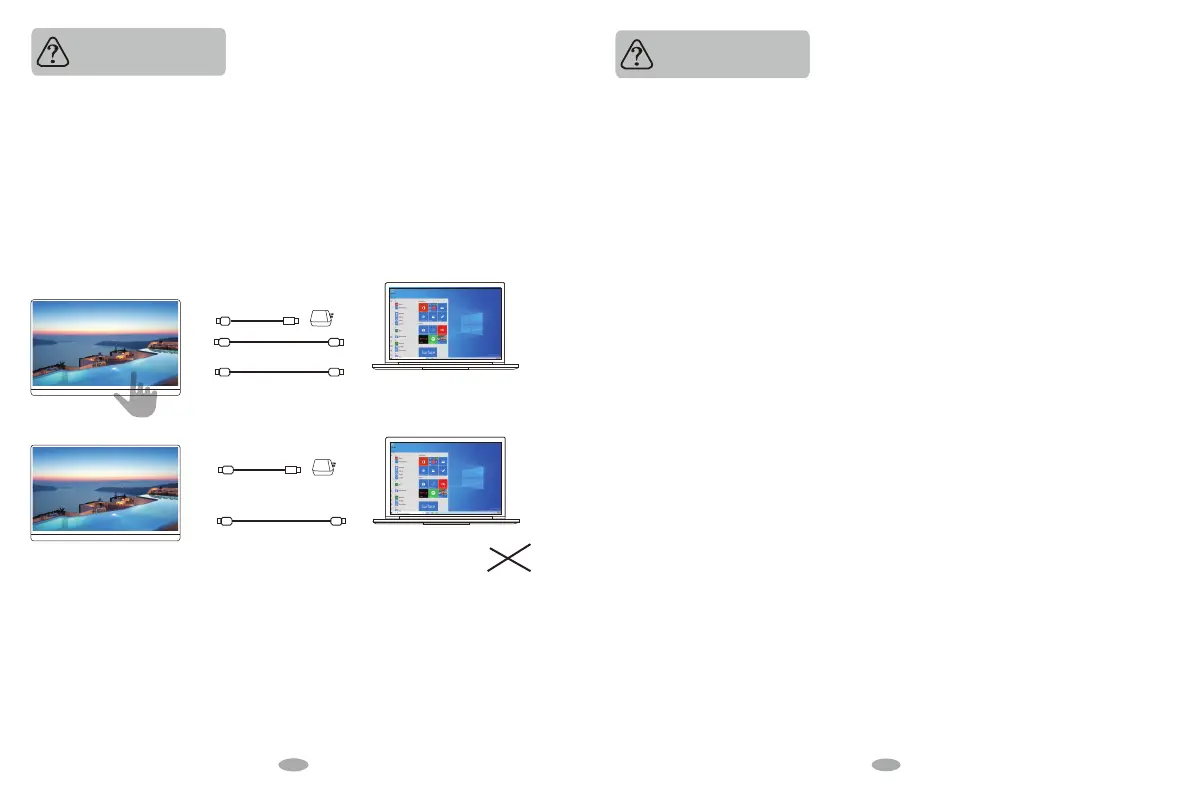
3. For computer equipment / micro-host. In this case,you need to check whether the connection method is correct.
Please use the original cable provided.
Most of the cases that the monitor cannot touch are caused by the wrong connection method.
The following picture is an example.
The left picture is the correct connection method, and the right picture is the wrong connection method.
Please refer to the picture.
4. If the connection method is correct and you still can't touch it, please try another computer device.
If it doesn't work with other computer devices still. P
lease connect us to replace the new touch cable for free to solve the problem.
Type-C to USB 3.0(For Touch)
Type-C to Type-C
Type-C to Type-C
PD 45W
PD 45W
Mini HDMI to HDMI
(Video/Audio signal)
Mini HDMI to HDMI
(Video/Audio signal)
Note:
The touch cable must be connected to the computer host instead of a power outlet.
√
Q: The display is started, showing "NO SINGAL" or "POWE SAVING".
1. If the monitor is connected to the mobile phone with TYPE-C to TYPE-C cable, please check if the
mobile phone supports USB3.1.If the mobile phone doesn't support USB3.1, it cannot be directly
connected to the monitor and requires the HDMI adapter to tranfer signal.
2. If using TYPE-C to TYPE-C cable to connect with the computer, please check whether the computer
interface supports Thunderbolt 3. If it does not support Thunderbolt 3, please use an HDMI cable to
tranfer signal and the TYPE C cable to supply power.
3. Please check whether the connection method is correct firstly, and reconnect the cables. Please use
the original cable provided. If you use the adapter you purchased, please troubleshoot the problem yourself.
4. Please try another computer device. It doesn't work with other computer devices still,please connect
us to replace the touch cable for free to solve the problem.
Q:The monitor is constantly restarting the switch during the operation.
1. This phenomenon is caused by insucient power supply of the display, because the display is 4K + touch,
which requires large power support. In this case, you only need to use the original cable attached to power
the display with an additional PD power supply. .
2. If use the mobile power bank to power the display, please confirm whether the mobile power bank is a
PD power bank that has reached 30W or more. If you need a suitable power bank, you can contact us.
3. If can't solve the problem above, please try another computer device. It doesn't work with other
computer devices still,please connect us to replace the new touch cable for free to solve the problem.
Q:During the operation of the display, there are abnormal conditions,
like the splash screen or spots.
1. This phenomenon is caused by insucient power supply of the display, because the display is 4K + touch,
which requires large power support. In this case, you only need to use the original cable attached to power
the display with an additional PD power supply. .
2. If use the mobile power bank to power the display, please confirm whether the mobile power bank is a
PD power bank that has reached 30W or more. If you need a suitable power bank, you can contact us.
3. If can't solve the problem above, please try another computer device. It doesn't work with other
computer devices still,please connect us to replace the new touch cable for free to solve the problem.
Q: Gravity sensing is not available
1. Please go back to the menu bar of the monitor to open the corresponding angle of gravity sensing.
2. Refer to the instruction manual, we have written down in detail how to operate the gravity sensor,
please follow the method.
3. The above cannot be resolved, please contact our professional customer service team, we will solve the
problem for you within 6-12 hours.
Q:The monitor fails to start and the screen is blank.
1. Please press the power switch button first;
2. Please check whether the connection method is correct. You can unplug the cable and reconnect it.
Please use the original original cable and the PD power adapter.Note: most Samsung mobile phones can't
work with monitor's voltage, you must connect an additional PD power adapter to start the display.
3. The above cannot be resolved, please contact us.
14 1918


 To Next Page
 Loading...