© UPLIFT Desk • 1-800-349-3839 • 1-512-614-3152 • info@upliftdesk.com • upliftdesk.com
6
T
C
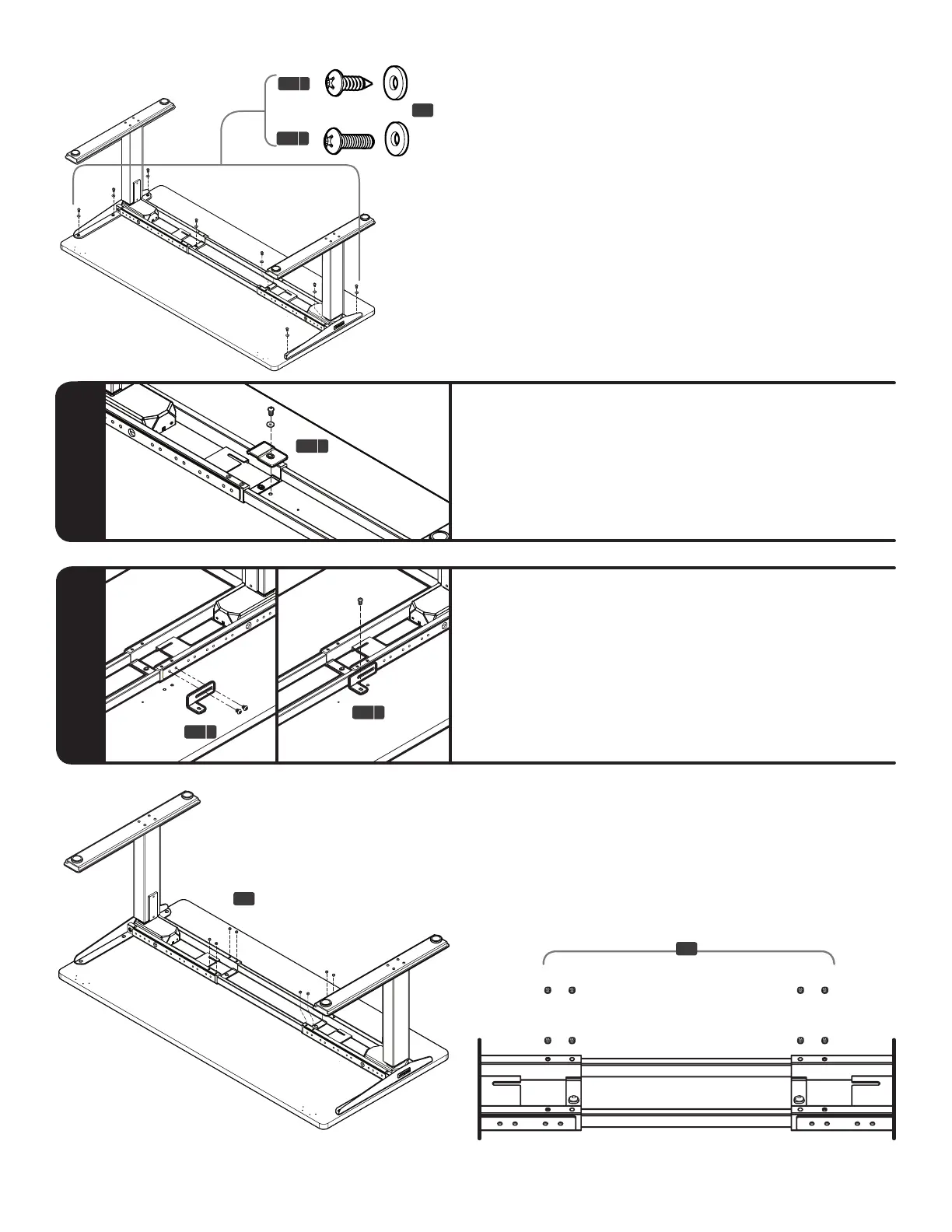
Step 6.2
Regarding our T-Frames
UPLIFT Desktops are pre-drilled for our C-Frames.
Use the L-brackets (C9b). Line them up to one of
the pre-drilled holes. Attach to the frame using two
M8x10 screws and then use one (1) of the screws cho-
sen above, along with one (1) washer to connect it to
the desktop.
C9 b
C9 b
Step 7
Secure the Center rails at both ends using eight (8)
M8x8 Cup point set screws (H2), four (4) per side.
Tighten using the 4mm Allen wrench (H6).
The Center rails do not need to be perfectly centered,
but make sure that all eight Set screws make contact
with the rails.
H2
H2
C9 a
or
H4 b
H4 a
C3
C4 C5
C9
H4a
H7
C6
H1 H2 H3
H5
H4b
H6
C7
C3
C4 C5
C9
H4a
H7
C6
H1 H2 H3
H5
H4b
H6
C7
C3
C4 C5
C9
H4a
H7
C6
H1 H2 H3
H5
H4b
H6
C7
C3
C4 C5
C9
H4a
H7
C6
H1 H2 H3
H5
H4b
H6
C7
H5
Step 6
Choose which screw should attach frame to desktop.
If your pre-drilled desktop does not have metal thread-
ed inserts, use the #10x3/4’’ Wood screws (H4a).
If your pre-drilled desktop does have metal threaded
inserts, use the #10-24x3/4’’ Machine screws (H4b).
After ensuring that the desk frame is properly posi-
tioned, attach the frame to the desktop using eight
(8) of the chosen screws (H4a or H4b) and eight (8)
Washers (H5).
Make sure all screws are started before fully tighten-
ing them.
NOTE: See below for important information on this
step regarding C-Frame and T-Frame assembly.
Step 6.1
Regarding our C-Frames
If the pre-drilled holes tional End bracket (C9a), and
attach using one (1) of the screws chosen above, and
one (1) washer.


 To Next Page