25
3.7 GRID Mode
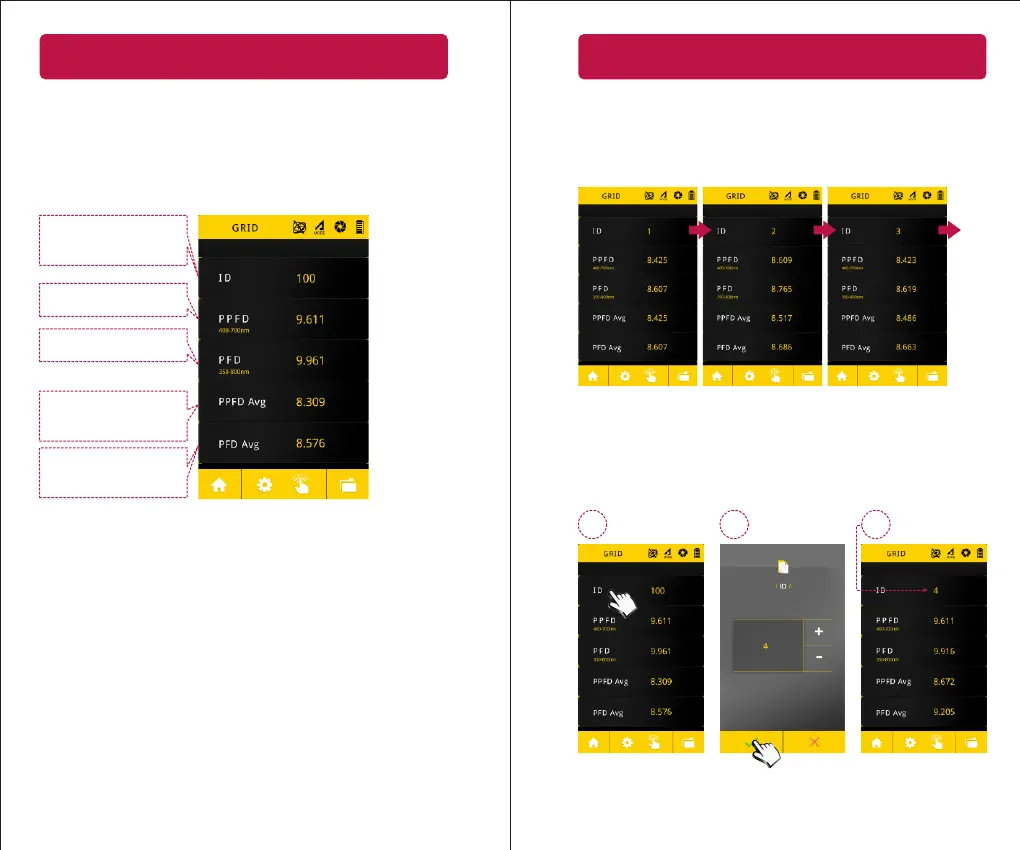
Click”GRID”icon in main menu to collect the data from different
posions and provide the average, maximum, minimum,
uniformity, and, diversity values on – Lux, PPFD, PFD, PFD-B,
PFD-G, PFD-R, PFD-UV, and, PFD-FR.
ID number – the maximum
number of data is 100.
The PPFD value of this ID
The PFD value of this ID
The average PPFD value of
total measurements.
The average PFD value of
total measurements.
26
3.7 GRID Mode
1 32
Measurement
Aer press the measurement buon at boom center of
screen or the measurement key at le hand side, the ID filed
will switch to the next ID number in sequence (1-100).
...
ID seng
1. Press the “ID” item.
2. Use +/- key to adjust the ID number.
3. Return to the measurement page, the ID number is updated.


 To Next Page