20
DS4057-001C
B. CALLER ID
You may need to subscribe to a service offered by your telephone operator to use this
function.
The caller ID function must be programmed on the PABX switchboard to enable the transit
of information between network and telephone. Follow the instructions in the switchboard
operation manual.
The caller ID function is used to show the caller’s telephone number on the display.
The caller’s phone number will appear on the display after the fi rst ring.
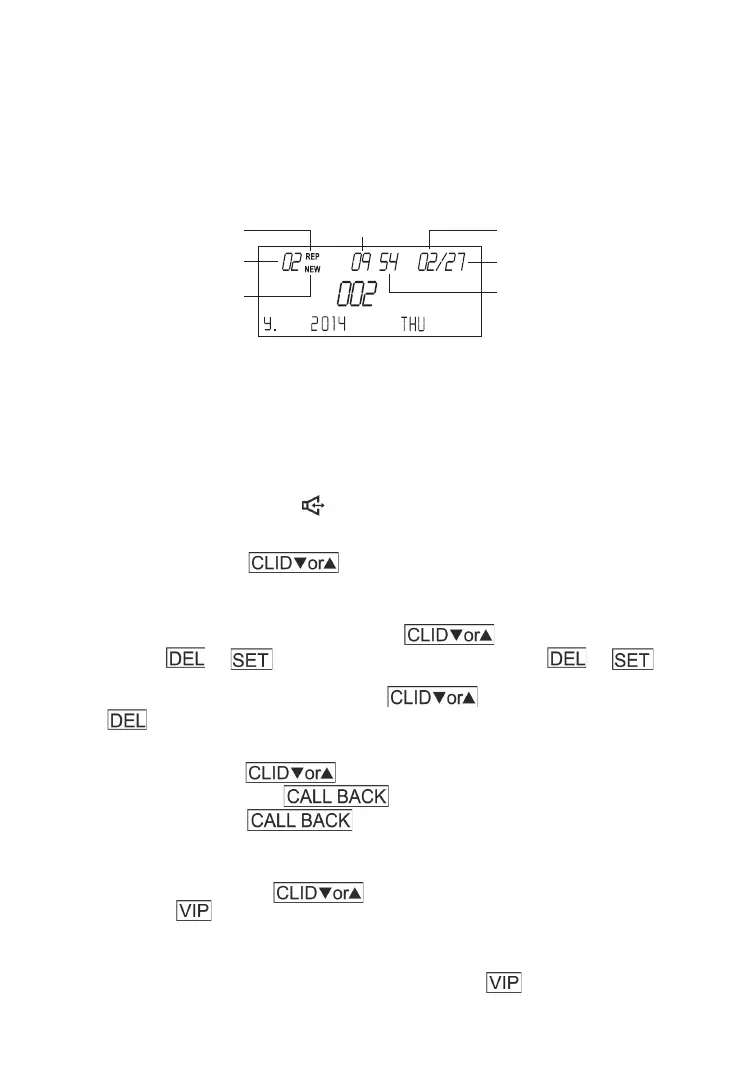
Repeat call
Call number
New call
MonthTime
Day
Minutes
Alternatively, the message NOT AVAILABLE (if the caller is in an area which is not covered by
the service) will appear.
The message REP, time and date of the last call will appear on the display if several calls
were received by the same number.
If the caller’s number is longer than 16 digits, the fi rst 16 digits will appear on the central line
for approximately two seconds. The remaining numbers (up to 20) will be alternated with the
fi rst. The display will also show the name alternated with the second part of the number if the
number is stored in the phonebook.
Simply pick up the handset or press to answer the call.
1. Caller ID Review:
In on-hook status, press to review the caller’s phone number and the time
of call.
2. Delete Caller IDs:
a. When you check the incoming calls, press to fi nd the call you wish to
delete. Press or once to ask delete the number. Press or again
to comfi rm.
b. When you check the incoming calls, press to review Caller IDs, Press and
Hold for 3 seconds to delete all calls.
3. Call Back from the Caller IDs:
In on-hook status, press to select the call you wish to dial from the caller ID
list, pick up handset or press and the number will be dialed. If you have
set up a PREFIX, press twice to add the PREFIX in front of telephone
number automatically.
4. Set Remove/Dial VIP Number:
a. In on-hook status, press to select a number you wish to set as a VIP
number. Press and the number will be set as a VIP number. VIP number will be kept
in Caller ID list all the time. When Caller ID memories reach 76, new Caller ID will replace
the fi rst Caller ID memory automatically, but VIP will not be replaced unless VIP setting is
removed.You can set 20 VIP numbers at most using the same method.
b. When you review the Caller ID numbers, press again to remove the
VIP setting.




 To Next Page