Page 38
LPX SEED TREATER
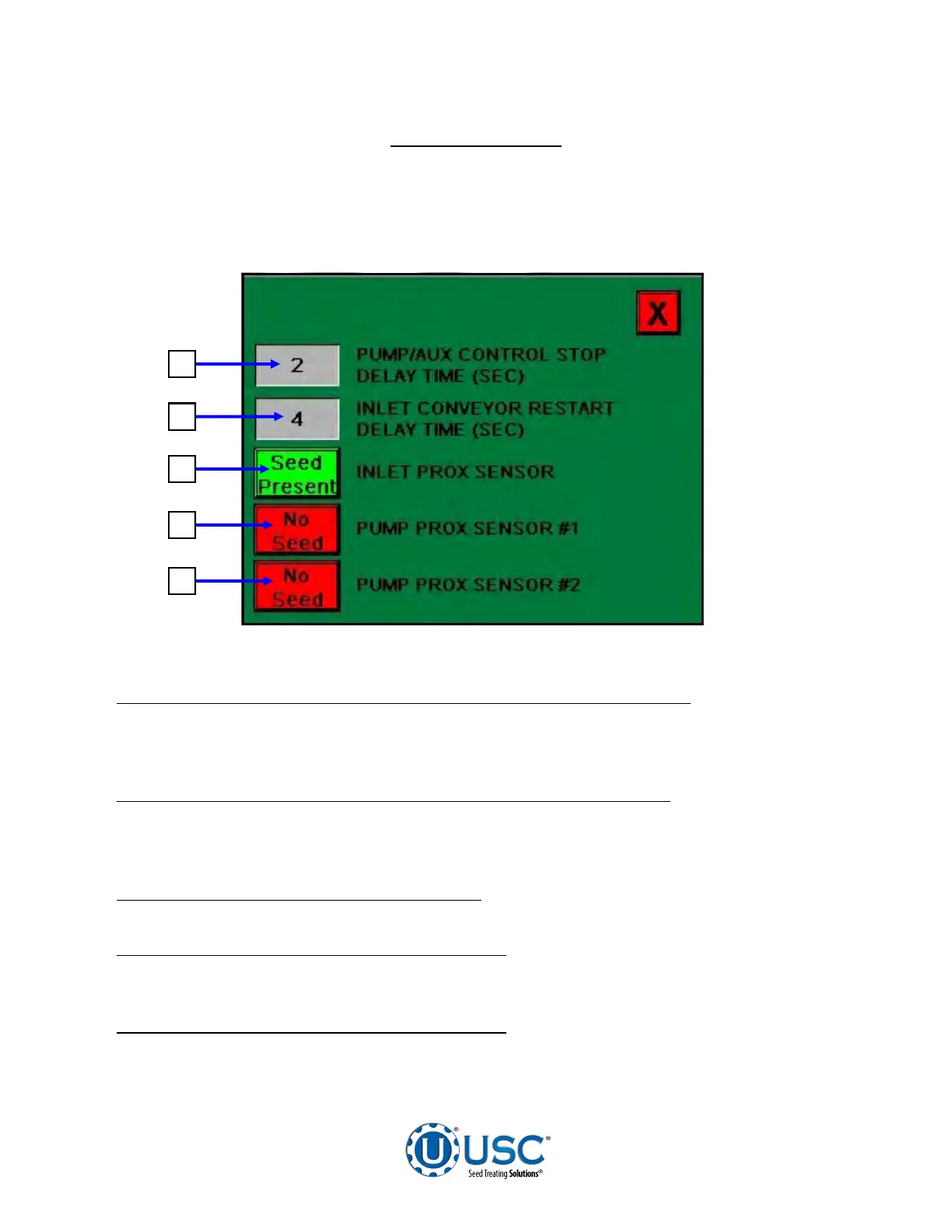
This screen allows the operator to set various system parameters and view the status
of the proximity switches.
1. PUMP / AUX CONTROL STOP DISPLAY TIME (SEC) MODULE:
When this
button is pressed, a numeric touch pad will appear and allow the operator to manually
adjust the length of time that the pump will remain on once the pump proximity sensor
no longer is seeing seed.
2. INLET CONVEYOR RESTART DELAY TIME (SEC) MODULE:
When this button
is pressed, a numeric touch pad will appear and allow the operator to manually adjust
the length of time the inlet conveyor remains off after the top proximity switch no longer
detects seed.
3. INLET PROXIMITY SENSOR DISPLAY:
Informs the operator when the proximity
switch located in the supply hopper above the treater is detecting seed.
4. PUMP PROXIMITY SENSOR #1 DISPLAY:
Informs the operator when the pump
proximity switch #1, which is located in the cone of the treater or the seed wheel, is
not detecting seed.
5. PUMP PROXIMITY SENSOR #2 DISPLAY:
Informs the operator when the pump
proximity switch #2, which is located in the seed wheel, is not detecting seed. This
display is only visible if the treater is utilizing a seed wheel.
UTILITIES SCREEN
1
2
3
4
5


 To Next Page