Page 39
LPX SEED TREATER
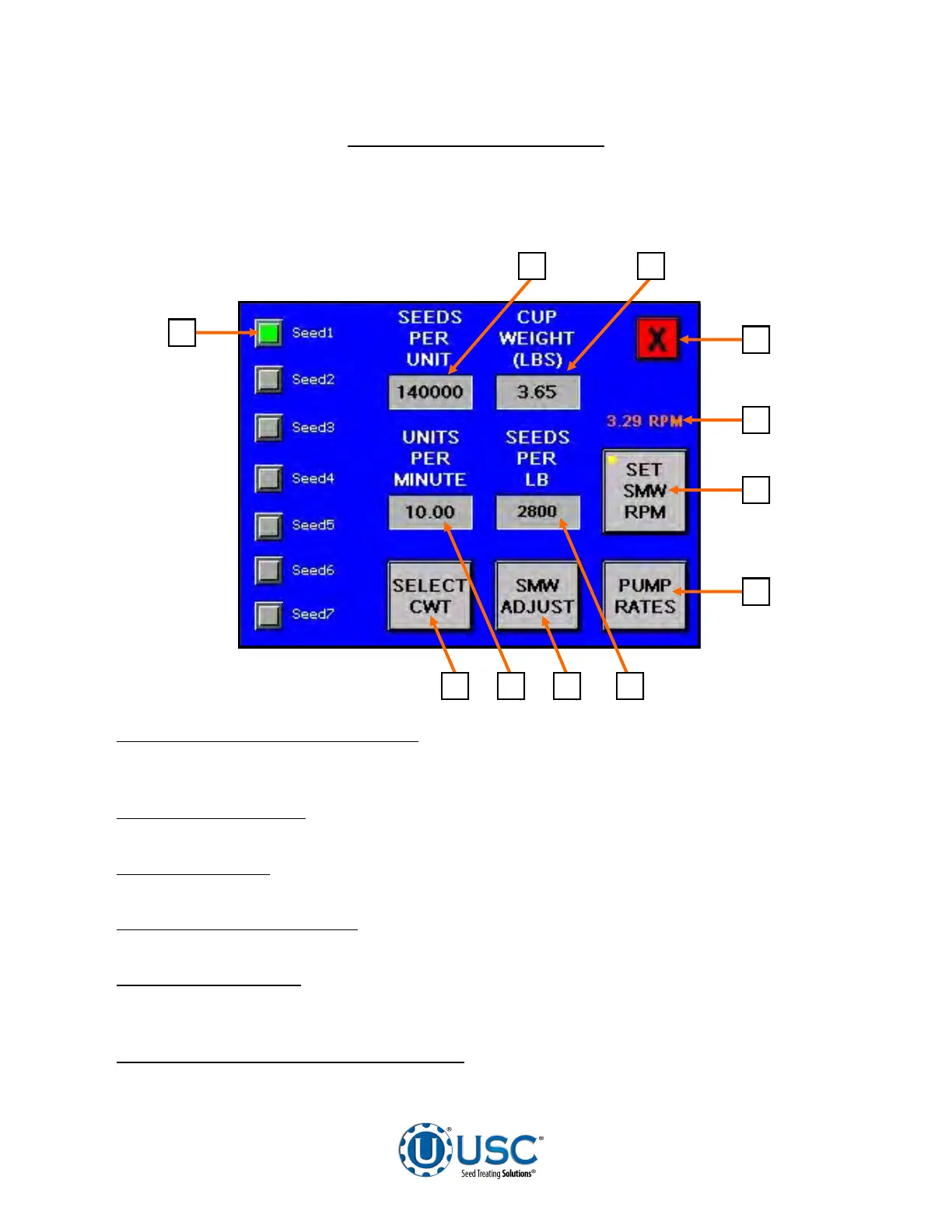
CALIBRATION SCREEN SCU
7
6
1
2 3
4
5
9 8 10 11
This screen allows the operator to select seed type, unit of measurement, pump rates
and Seed Wheel settings if the treater is equipped with one. The default setting is
Seed Counts per Unit. It can also be set to Cut Weight.
1. SELECT SEED TYPE MODULE:
The operator can select between seven different
pre-determined seed types. Press the name of the Seed Type and an alpha numeric
keyboard will popup allowing the operator to change the name.
2. SEEDS PER UNIT:
Pressing this button will bring up a numeric keypad which
allows the operator to input the number of seeds per unit.
3. CUP WEIGHT:
Pressing this button will bring up a numeric keypad which allows
the operator to input the cup weight for the Seed Wheel (see page 43).
4. SCREEN EXIT BUTTON:
This button is used to exit back to the previous screen.
Its functionality is the same throughout the HMI display.
5. RPM INDICATOR:
When any of the parameters on this screen are changed the
indicator modifies the Seed Wheel RPM. The operator must press the SET SMW RPM
button below it to actually make the change on the H-O-A screen.
6. SET SEED METERING WHEEL RPM:
Pressing this button will change the RPM
setting on the H-O-A screen to match the number on the RPM Indicator.


 To Next Page