Page 40
LPX SEED TREATER
CALIBRATION SCREEN SCU
7.
PUMP RATES:
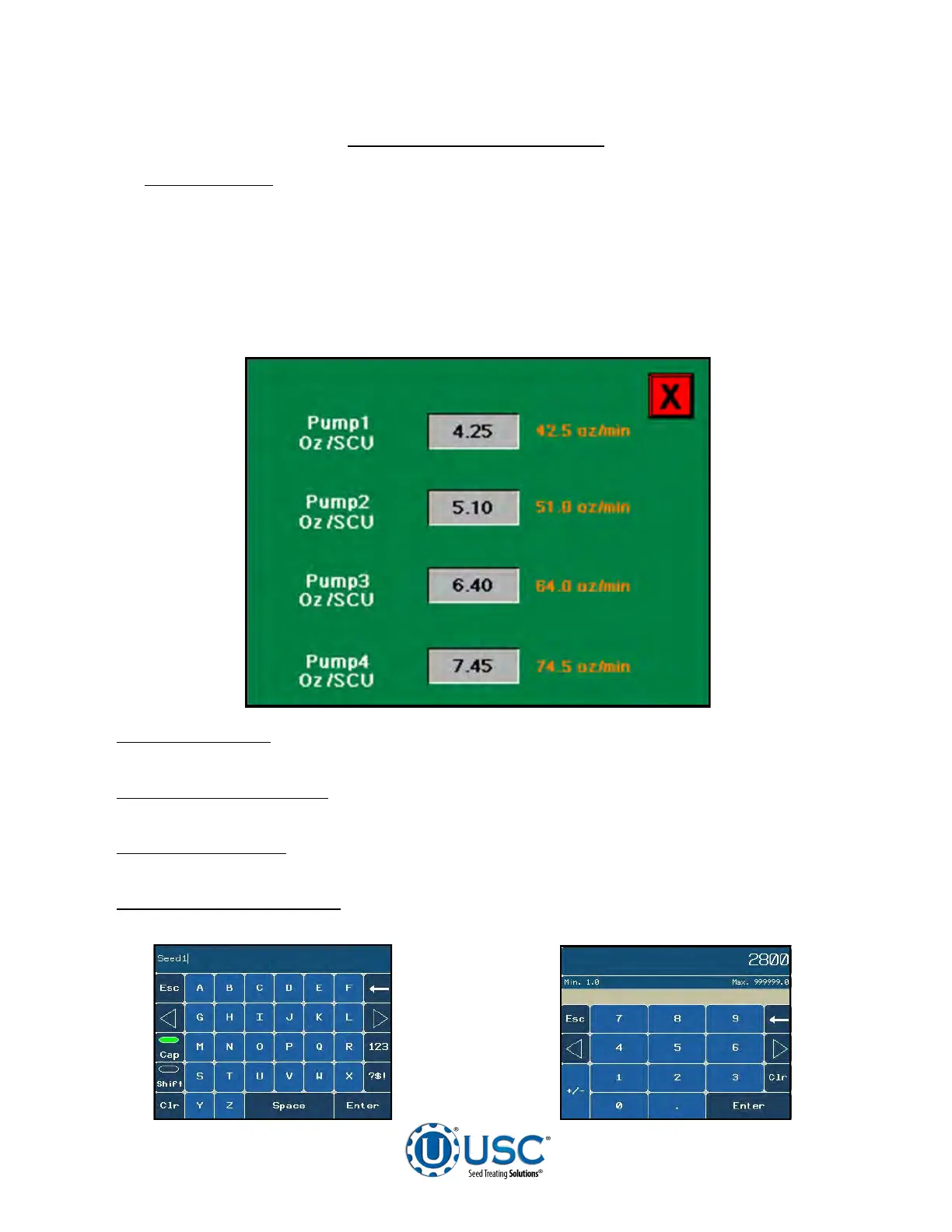
Pressing this button takes the operator to the screen below. By
pressing the pump name an alphanumeric keypad will popup allowing the operator
to key in a new name (below left). Press the grey buttons in the center, a numeric
keypad will popup to change the value of the amount of chemical per Seed Count
Unit (below right). This is only a calculator. The number to the right will give the
operator the ounces per minute required based on the current flow rate. Manually
adjust your flow meter to reflect the change. If not using a flow meter, make the
adjustment on the liquid adjustment dial on the Pump Stand Control Panel.
8. SELECT CWT:
Pressing this button toggles back and forth between the default of
Seed Count Units and Cut Weight.
9. UNITS PER MINUTE:
Pressing this button will bring up a numeric keypad which
allows the operator to change the number of units treated per minute.
10. SMW ADJUST:
This button takes the operator to the Seed Metering Wheel
adjustment screen (see page 42).
11. SEEDS PER POUND:
Pressing this button will bring up a numeric keypad which
allows the operator to change the number of seeds per pound of a given seed type.


 To Next Page