Page 42
LPX SEED TREATER
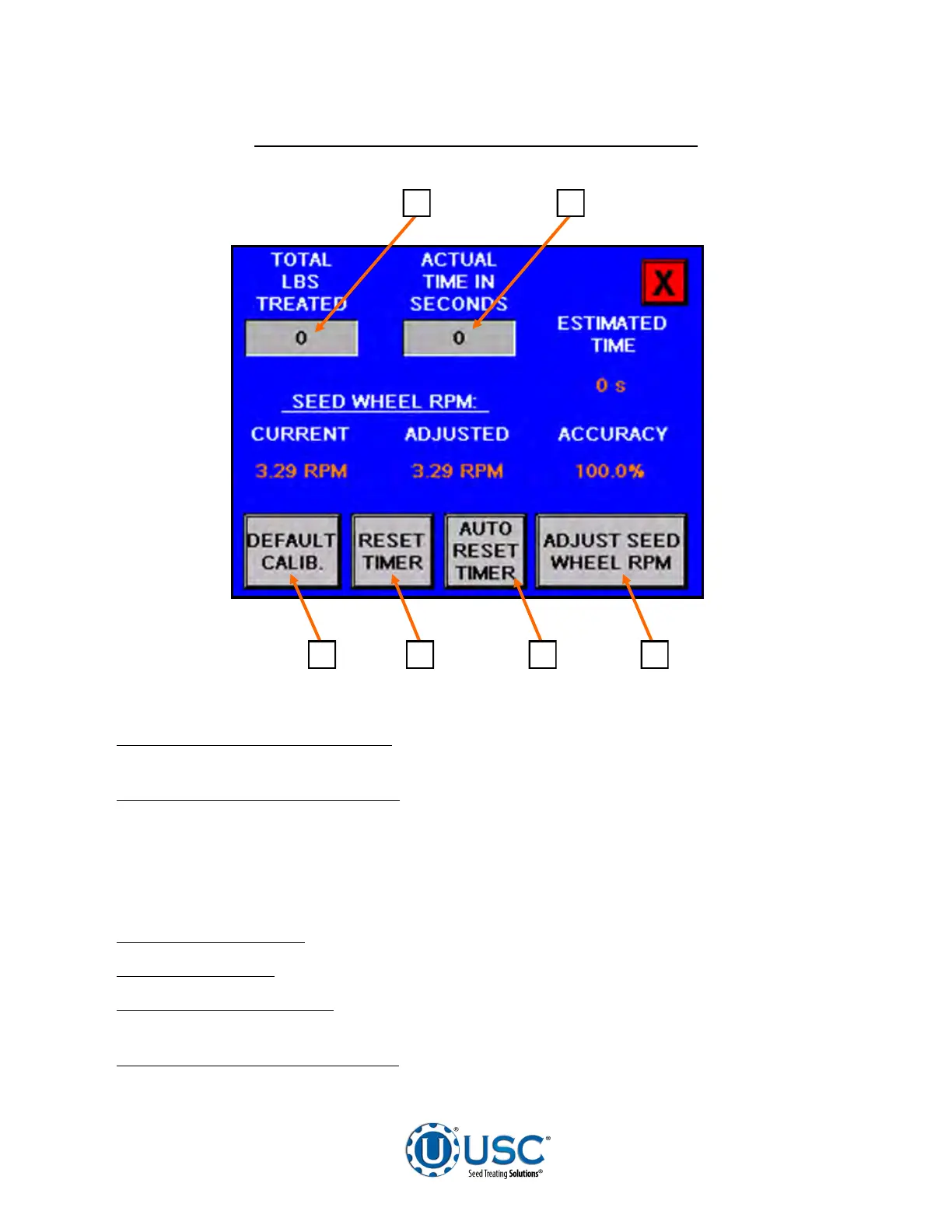
SEED METERING WHEEL ADJUSTMENT SCREEN
1 2
4 3 5 6
1. TOTAL POUNDS TREATED:
Pressing this button will bring up a numeric keypad
which allows the operator to manually input the amount that was treated.
2. ACTUAL TIME IN SECONDS:
This button indicates the time it took to complete
the previous run. Pressing this button will bring up a numeric keypad which allows the
operator to input the amount of time they want it to take to treat that amount of seed.
After the new time is entered, press the ADJUST SEED WHEEL RPM button. This
returns the operator to the previous screen, now press the SET SMW RPM to
complete the change.
3. DEFAULT CALIB.:
Pressing this button resets calibration back to factory settings.
4. RESET TIMER:
Pressing this button zeroes out the timer.
5. AUTO RESET TIMER:
Pressing this button resets the timer to zero at the
beginning of every run if more than ten seconds has passed.
6. ADJUST SEED WHEEL RPM:
Pressing this button activates any of the changes
made from this screen and automatically returns them to the first calibration screen.


 To Next Page