11
Lowes.com
HUMIDITY SENSING FAN OPERATION
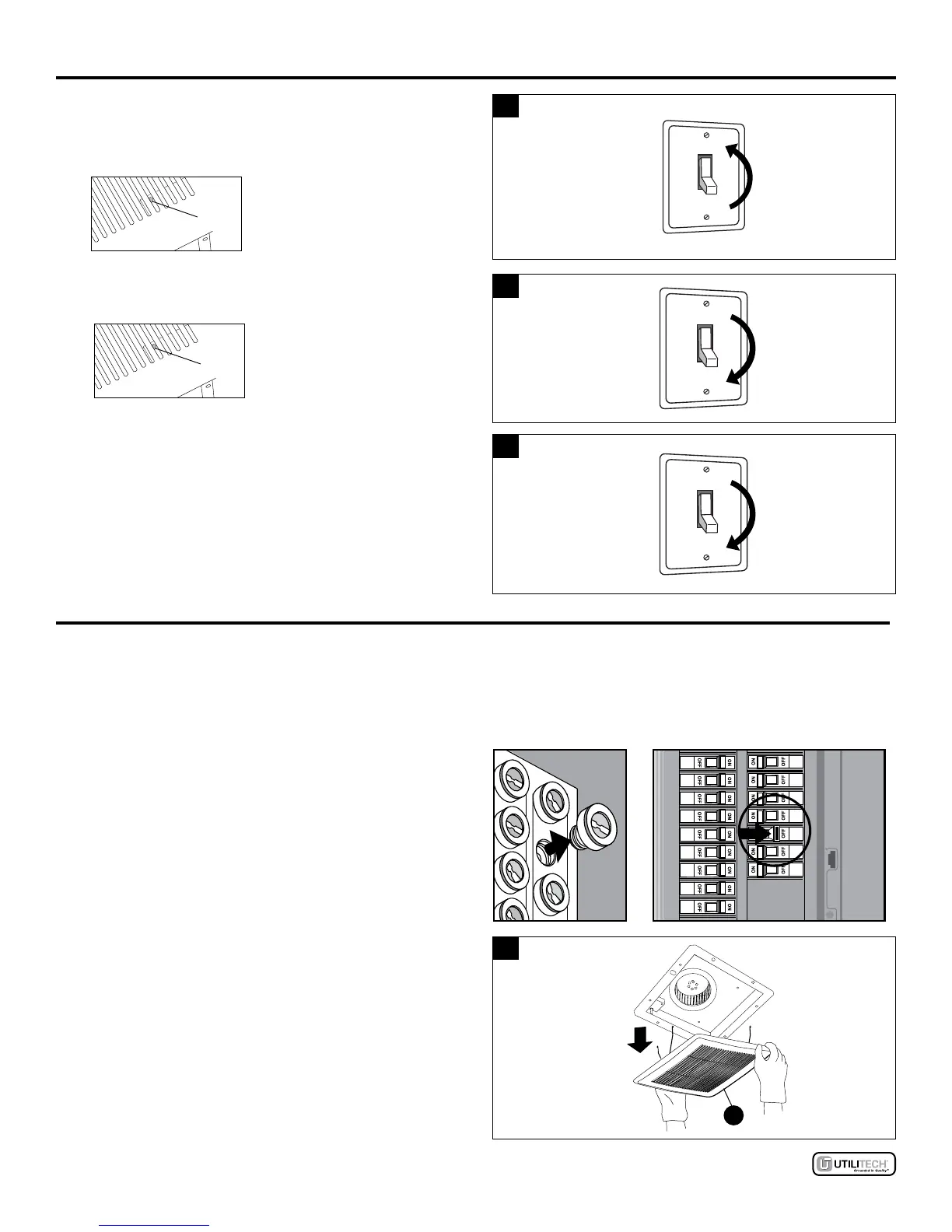
1. Humidity Sensing Mode: Move wall on/off switch to
“ON” position. LED indicator light in fan is BLUE. The fan
will automatically go on when humidity level in room
goes above 60%.
1
AMBER
LED
LIGHT
2. Full Speed Mode: Cycle wall on/off switch. LED
indicator light in fan is AMBER.
2
AMBER
LED
LIGHT
3. Fan Off: Move wall on/off switch to “OFF” position.
3
CARE AND MAINTENANCE
See safety information before proceeding. Routine maintenance should be done at least once a year.
• Never use solvents, thinner or harsh chemicals for cleaning the fan.
• Do not allow water to enter the motor.
• Do not immerse metal parts in water.
• Do not immerse resin parts in water over 140º Fahrenheit.
Turn off power source. Review all safety precautions.
1. Remove grille (B) by squeezing spring and pull down.
1
B



 To Next Page