EasyManua.ls Logo

Utilitech 7131-04 - User Manual

Utilitech 7131-04
26 pages
Print Icon
To Next Page IconTo Next Page
Loading...
ITEM # 5632649
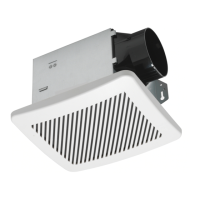
VENTILATION FAN WITH
HUMIDITY SENSOR
MODEL 7131-04
Español p. 14
SS23661
UTILITECH & logo design are trademarks or registered
trademarks of LF, LLC. All rights reserved.
08/2023
Questions, problems, missing parts? Before returning to the store, call our customer
service department at 866-994-4148, 8 a.m. - 8 p.m., EST, Monday - Sunday. You could also
contact us at ascs@lowes.com.
READ AND SAVE THESE INSTRUCTIONS
ATTACH YOUR RECEIPT HERE
Serial Number
___________________________
Purchase Date
___________________________

Questions and Answers

  • R
    Rachel WilliamsAug 7, 2025
    What to do if my Utilitech 7131-04 has abnormal sound or vibration?
    • S
      Sara MartinAug 8, 2025
      If your Utilitech Fan is making abnormal sounds or vibrating, there are a few things you can check: - Make sure the fan housing is securely attached to the ceiling joists or wall studs. - Ensure the grille is pushed upward gently until it's firmly attached to the fan housing. - Verify that the circular duct is secured to the duct connector with duct tape or a clamp to create an airtight connection.
  • A
    Antonio PattersonAug 15, 2025
    Why is my Utilitech 7131-04 Fan so loud?
    • A
      Angela StewartAug 16, 2025
      A Utilitech Fan may be louder than expected for several reasons. The CFM might be too high for the room's square footage, so ensure the CFM rating matches the room size. Check the damper for damage or improper function; if damaged, contact Customer Service. Avoid sharp duct bends within 18 inches of the fan discharge. Using the recommended duct size can reduce noise if the fan discharge is reduced to fit a smaller duct. Also, ensure the fan is securely attached to the ceiling joists.
  • J
    John StewartAug 22, 2025
    How to improve humidity clearing with my Utilitech 7131-04?
    • H
      haleericAug 22, 2025
      If your Utilitech Fan isn't effectively clearing humidity, it could be due to insufficient airflow intake. Ensure a door or window is slightly open to allow airflow, as the fan needs sufficient airflow to draw air out of the room. Also, verify that the CFM rating of the fan matches the square footage of your room, as insufficient CFM can also cause this issue.
  • H
    hollyrobinsonAug 29, 2025
    Why does my Utilitech 7131-04 Fan keep running?
    • S
      Shawn DawsonAug 29, 2025
      Your Utilitech Fan might continue running due to outdoor humidity back drafting into the fan; it's good to let it run in this case, as the electrical cost is minimal. Also, check if the fan is in manual mode. To enable humidity sensing, ensure this function is selected; the LED indicator light in the grille will be blue when humidity sensing mode is on.

Summary

Product Overview

Product Specifications

Key performance metrics like airflow, voltage, sound output, power consumption, and sensor tolerance.

Package Contents

Lists included parts such as fan housing, grille, and duct connector with their respective quantities.

Safety and Preparation

Safety Information

Essential warnings and precautions for electrical safety, installation, and proper usage to prevent hazards.

Preparation Steps

Guidance on checking parts, tools required, and initial site preparation before installation begins.

Dimensions and Wiring

Details on physical dimensions for ceiling opening and housing, plus electrical connection diagrams and requirements.

Installation Instructions

New Construction Installation

Step-by-step guide for installing the fan in new construction scenarios, covering housing mounting and wiring.

Existing Construction Installation

Step-by-step guide for replacing an existing fan or installing in existing structures, including unit removal.

Operation and Maintenance

Operating Instructions

Explains how to use the fan in humidity sensing mode and full speed mode, and how to adjust settings.

Care and Cleaning

Procedures for safely cleaning the fan housing and grille to maintain optimal performance and sensor accuracy.

Support and Warranty

Troubleshooting

Common operational issues, their potential causes, and recommended solutions for fan performance problems.

Limited 5-Year Warranty

Details on the product's warranty coverage, limitations, exclusions, and the process for making a claim.

Utilitech 7131-04 Specifications

General IconGeneral
BrandUtilitech
Model7131-04
CategoryFan
LanguageEnglish

Related product manuals