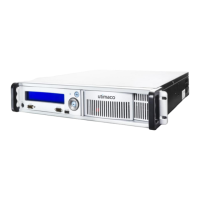
3.3.2 Ports and Operating Elements behind the Front Door
Figure 9: CryptoServer LAN V4 – Ports and operating elements behind the front door
Mute key for the signal tone that sounds if a power supply fails or is switched off
On/off switch (Switch for turning on/off the des CryptoServer LAN)
ERASE CS
Push-button for performing an External Erase on the integrated CryptoServer (CSe-Series
or Se-Series Gen2)
ERASE CS 2 (only connected if two CryptoServer are available)
Push-button for performing an External Erase on a second integrated CryptoServer (CSe-
Series or Se-Series Gen2)
USB Host
USB 2.0 port of the CryptoServer LAN
USB CS 2 (only connected if two CryptoServer are available)
USB 2.0 port of a second integrated CryptoServer used for the administration of this
CryptoServer
Battery compartment for the external battery of the CryptoServer LAN
Table 6: Ports and operating elements behind the front door
3.4 Bringing the CryptoServer LAN V4 into Service
To bring the device into service, follow these steps:
1. Put the CryptoServer LAN in a 19″ rack.
2. Put it in the place where you want it to stay.


 To Next Page